Gboard Alternatives for Android: 7 Keyboards Worth Switching To
The best Gboard alternatives for Android, by what you care about: privacy and offline typing, AI writing, grammar, customisation or Samsung features.
The best Gboard alternatives for Android are Microsoft SwiftKey for AI features and swipe typing, HeliBoard and FUTO Keyboard for privacy and offline typing, Samsung Keyboard if you have a Galaxy phone, Grammarly Keyboard for grammar help, and FlorisBoard or AnySoftKeyboard if you want open-source customisation. Gboard is still excellent at glide typing and voice input, so the right switch depends on what's pushing you away from it: privacy, missing AI tools, or simply wanting something different. Here's what each one is good at, and where it falls short.
What Gboard does well (and why people leave)
Gboard is free, has no ads, and its glide typing, voice typing and multilingual support are hard to beat. People switch for three main reasons: they don't want a Google keyboard seeing their typing, they want AI writing help built in, or they want more control over layout and looks. Keep that in mind as you read: if voice typing in many languages is what you rely on, most alternatives are a step down.
1. Microsoft SwiftKey: best all-rounder with AI
SwiftKey is the closest like-for-like replacement. Its swipe typing (called Flow) and prediction are as good as Gboard's, it has a clipboard manager, built-in translation, hundreds of themes, and Microsoft's Copilot for rewriting and changing tone. It's free. Your typing data can sync to a Microsoft account if you sign in, so it doesn't solve the "big tech sees my typing" problem; it moves it to a different company.
2. HeliBoard: best for privacy
HeliBoard is a free, open-source keyboard based on the Android Open Source Project keyboard. It doesn't ask for internet access, so nothing you type can leave the phone. It has an incognito mode, a clipboard history, themes, multiple languages and plenty of layout options. Glide typing needs an extra library that you add yourself, and predictions are simpler than Gboard's. Get it from F-Droid or GitHub.
3. FUTO Keyboard: best offline voice typing
FUTO Keyboard works entirely offline, including swipe typing and its built-in voice input, which runs a speech model on the phone rather than sending audio to a server. That makes it the only real privacy-first answer to Gboard's voice typing. Its licence is source-available rather than fully open source, and it's still younger and rougher around the edges than the big names.
4. Samsung Keyboard: best on Galaxy phones
If you own a Galaxy, the keyboard you already have is a serious option. It ties into One UI, offers Galaxy AI writing tools (rewriting, tone changes and translation) on supported models, and has good themes and a resizable layout. It's not available on other brands.
5. Grammarly Keyboard: best for grammar and tone
Grammarly's keyboard checks spelling, grammar and clarity as you type and suggests rewrites, which is useful for work emails and messages in a second language. The basic corrections are free; full-sentence rewrites and tone suggestions need a paid plan. Its basic typing (prediction and swipe) is weaker than Gboard's, and text is processed on Grammarly's servers.
6. FlorisBoard: best open-source customisation
FlorisBoard is a modern open-source keyboard with a clean Material design, deep theming, a clipboard manager and an emoji panel. It's developed by volunteers, so expect the occasional rough edge, and its word suggestions and glide typing are simpler than Gboard's.
7. AnySoftKeyboard: the long-running open-source option
AnySoftKeyboard has been around for over a decade, is fully open source, and supports many languages through add-on packs, plus gesture typing, themes and a lot of settings. It looks dated next to newer keyboards, but it's stable and light on older phones.
How to choose
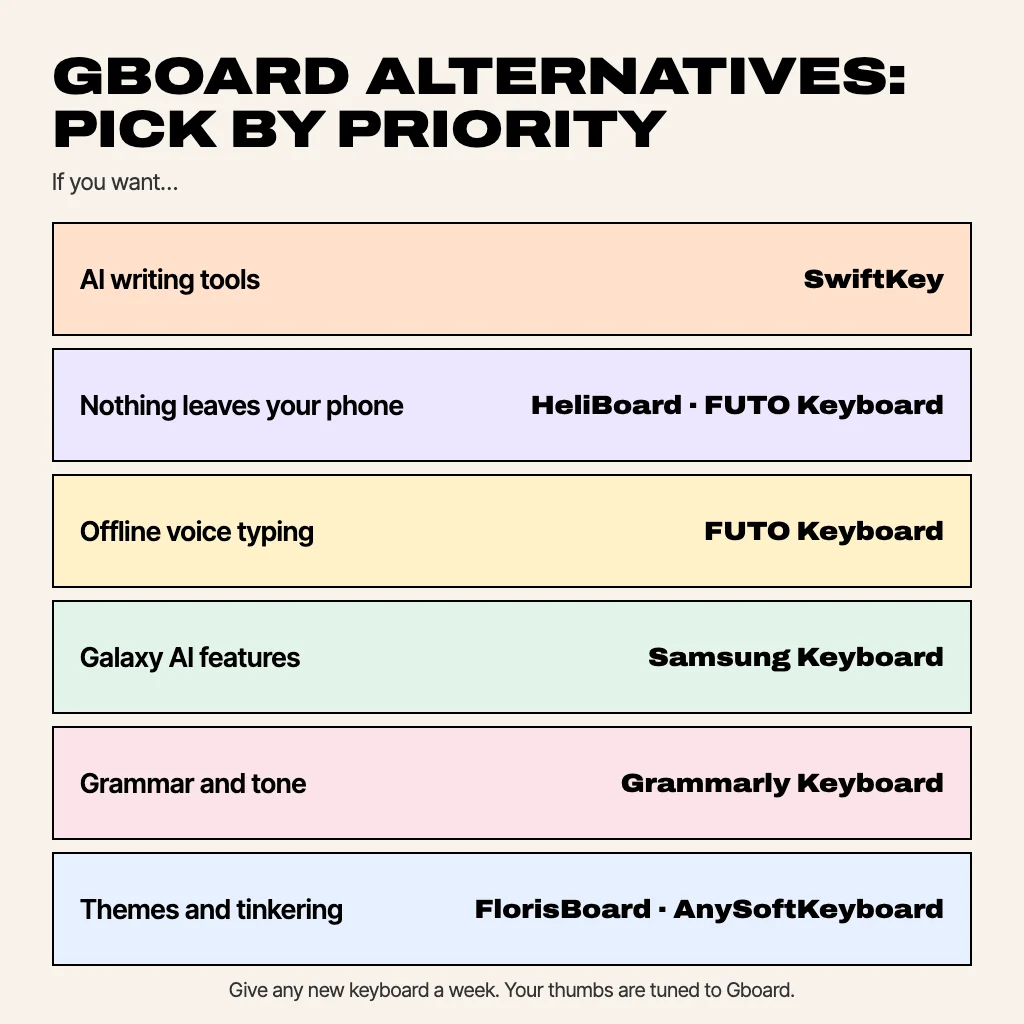
| If you want… | Try |
|---|---|
| Gboard, but with AI writing tools | SwiftKey |
| Nothing leaving your phone | HeliBoard or FUTO Keyboard |
| Offline voice typing | FUTO Keyboard |
| Galaxy AI features | Samsung Keyboard |
| Grammar and tone fixes | Grammarly Keyboard |
| Themes and tinkering | FlorisBoard or AnySoftKeyboard |
Whichever you pick, give it a week. Your thumbs are tuned to Gboard's key sizes and autocorrect habits, so every keyboard feels worse for the first few days. Switching back takes 30 seconds; our guide to how to change keyboard on Android covers both directions.
Coming soon: MagicBoard
We're building our own: MagicBoard, an AI keyboard for Android. The typing basics run on your phone (swipe typing, next-word prediction and autocorrect that learn your words without uploading them), and one tap gives you AI replies, rewrites, grammar fixes and translation. It also has an emoji picker, a clipboard manager and light, dark and auto themes. It isn't on Google Play yet; the app page will have the link when it is.
Common questions
What is the best alternative to Gboard?
For most people, Microsoft SwiftKey: equally good swipe typing and prediction, plus AI tools. For privacy, HeliBoard or FUTO Keyboard.
Is there a better keyboard than Gboard?
Better depends on what you need. SwiftKey matches it with more AI features, FUTO beats it on privacy, and Samsung Keyboard fits Galaxy phones better. Gboard still leads on multilingual voice typing.
What is the most private keyboard for Android?
HeliBoard, which doesn't request internet access at all, and FUTO Keyboard, which works fully offline including voice input.
Is there an open-source Gboard alternative?
Yes: HeliBoard, FlorisBoard and AnySoftKeyboard are open source. FUTO Keyboard's code is available but under a source-available licence.
How do I replace Gboard?
Install the new keyboard, enable it in Settings → System → Keyboard → On-screen keyboard, and set it as the default.
From the studio
Previous Article
How to Change Keyboard on Android (and Back to Normal)
Next Article
Dirty Dice Game Rules Printable: Free PDF With Dice Templates