SwiftKey Alternative for Android: 6 Keyboards Worth Switching To
The best SwiftKey alternative for Android: Gboard for swipe, FUTO or HeliBoard for privacy, MagicBoard for AI replies, plus Samsung and CleverType.
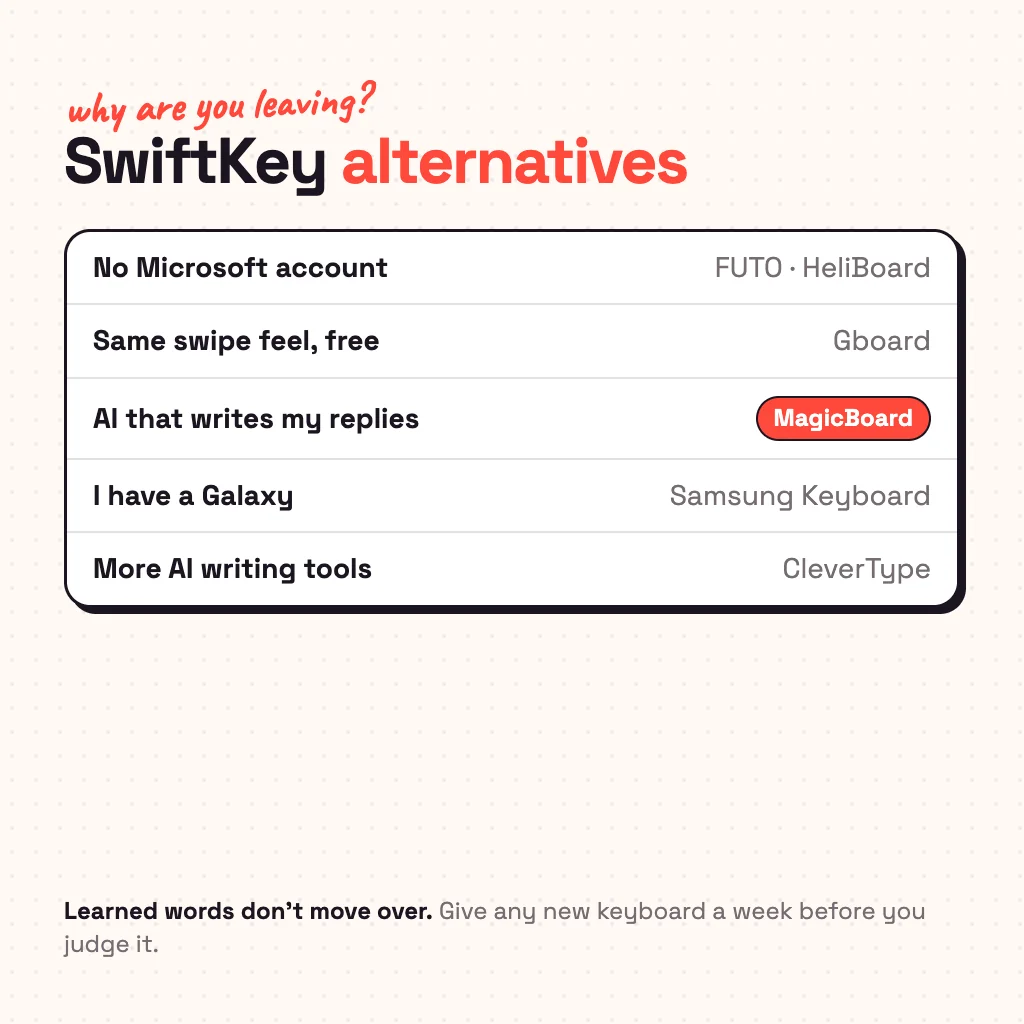
The best SwiftKey alternative for Android is Gboard if you mainly want great swipe typing for free, FUTO Keyboard or HeliBoard if you're leaving because of privacy and want a keyboard that works offline, MagicBoard if you used SwiftKey's Copilot and want AI that writes the reply from the chat, Samsung Keyboard on a Galaxy, and CleverType for heavier AI writing. Which one fits depends on why you're leaving SwiftKey: the Microsoft account, the AI, or the typing itself.
Why people are looking for a SwiftKey alternative
- The Microsoft account. Microsoft retired standalone SwiftKey accounts on 31 May 2026. Backup and sync now need a Microsoft account, with typing data stored there; people who had signed in with Google or Apple had to link one or lose their synced data.
- Copilot everywhere. The toolbar has grown AI buttons, Bing and Copilot entries. Some people want a plainer keyboard; others want AI that does more than rewrite.
- Privacy in general. A cloud-synced keyboard learns from everything you type. If that bothers you, the fix is a keyboard that never goes online.
Your learned words don't move between keyboards, so expect a week or two before any new keyboard predicts as well as your old one.
1. Gboard: the closest swap for swipe typing
If you liked SwiftKey for swiping and predictions, Gboard is the nearest match and it's already installed on most Android phones. Glide typing, multilingual typing, voice typing and clipboard are all free. On a Pixel 9 or 10 it also has on-device AI writing tools (Proofread, Rephrase). The trade-off: it's Google instead of Microsoft, so it's no answer if you're leaving for privacy. Our Gboard alternatives guide covers the other direction.
2. FUTO Keyboard: offline, with swipe and voice
FUTO Keyboard runs entirely on the phone and never needs the internet. Unlike most privacy keyboards it has swipe typing and offline voice typing built in, which makes it the most comfortable switch from SwiftKey for privacy reasons. It's free to use with an optional payment, and its source code is public.
3. HeliBoard: open source and minimal
HeliBoard is an open-source keyboard based on Android's original AOSP keyboard. It has no internet permission at all, multiple languages, themes and a clipboard history. Swipe typing isn't included by default: you add a glide-typing library file yourself. Pick it if you want the plainest, most private keyboard and type more than you swipe.
4. MagicBoard: if you want AI that writes your replies
We make MagicBoard, so weigh this with that in mind. If what you liked about SwiftKey was Copilot, MagicBoard goes a step further: in WhatsApp, Instagram, Telegram, Signal or Messages, tap ✨ Reply and it reads the messages on screen and gives you three whole replies. SwiftKey's Copilot rewrites what you typed; MagicBoard writes the first draft for you. It also fixes grammar with a short "why", rewrites in any tone, translates, and sums up long group chats.
It doesn't need any account. Your typing and learned words stay on the phone, and text only goes to the AI when you tap an AI button. Underneath it's a full keyboard with glide typing, next-word suggestions, GIFs, a clipboard and 35+ themes, in English, German, French, Spanish, Italian and Portuguese. It's free with 30 AI uses to start, then 3 a day; Pro removes the limit.
5. Samsung Keyboard: already on your Galaxy
On a Galaxy phone, Samsung Keyboard is a solid SwiftKey replacement with nothing to install: swipe, clipboard, translation, and Galaxy AI writing assist (tone and grammar) on supported models. It's Samsung-only.
6. CleverType: more AI writing tools
If you want more AI, not less, CleverType has a ChatGPT-style assistant in the keyboard: grammar, paraphrasing, tone changes and compose from a prompt. It works on a free word allowance, with paid plans from about $5 a month. Typing basics are weaker than SwiftKey's.
Which SwiftKey alternative should you pick?
| Your reason for leaving | Pick |
|---|---|
| Don't want a Microsoft account | FUTO Keyboard, HeliBoard, or MagicBoard (no account) |
| Want the same swipe feel, free | Gboard |
| Want AI to write replies, not just rewrite | MagicBoard |
| Have a Galaxy and want nothing new | Samsung Keyboard |
| Want more AI writing in the keyboard | CleverType |
How to switch from SwiftKey
- Install the new keyboard and open it once.
- Go to Settings → System → Keyboard → On-screen keyboard (on Samsung: General management → Keyboard list and default), turn the new one on and make it the default.
- Type with it for a week before judging predictions.
- If you're done with SwiftKey, delete your synced data from your Microsoft account privacy settings, then uninstall it.
Step-by-step screens are in our guide to changing the keyboard on Android, and our best AI keyboard for Android comparison goes deeper on the AI ones.
Common questions
What is the best alternative to SwiftKey on Android?
Gboard for the same swipe typing, FUTO Keyboard or HeliBoard for an offline, private keyboard, and MagicBoard if you want AI that writes replies from the chat.
Does SwiftKey need a Microsoft account now?
To back up and sync, yes. Standalone SwiftKey accounts were retired on 31 May 2026; typing without signing in still works.
Is there a private keyboard like SwiftKey?
FUTO Keyboard is the closest: offline, with swipe and voice typing. HeliBoard is fully open source with no internet access, but swipe needs an extra library.
Is there a SwiftKey alternative with AI?
Yes. MagicBoard writes replies from the conversation and rewrites what you type; CleverType has a ChatGPT-style writing assistant; Gboard has on-device AI on Pixel 9 and 10.
Will I lose my learned words if I switch?
Yes, they stay in SwiftKey. A new keyboard learns your words again within a week or two of normal typing.
From the studio
Previous Article
How to Record a Conversation (iPhone, Android and Phone Calls)
Next Article
How to Be That Girl (Without Burning Out by Week Two)