App That Responds to Texts for You: Auto-Reply vs AI Reply on Android
Apps that respond to texts for you come in two kinds: auto-reply apps that send a set message, and AI apps that write a real reply. Which one you need.
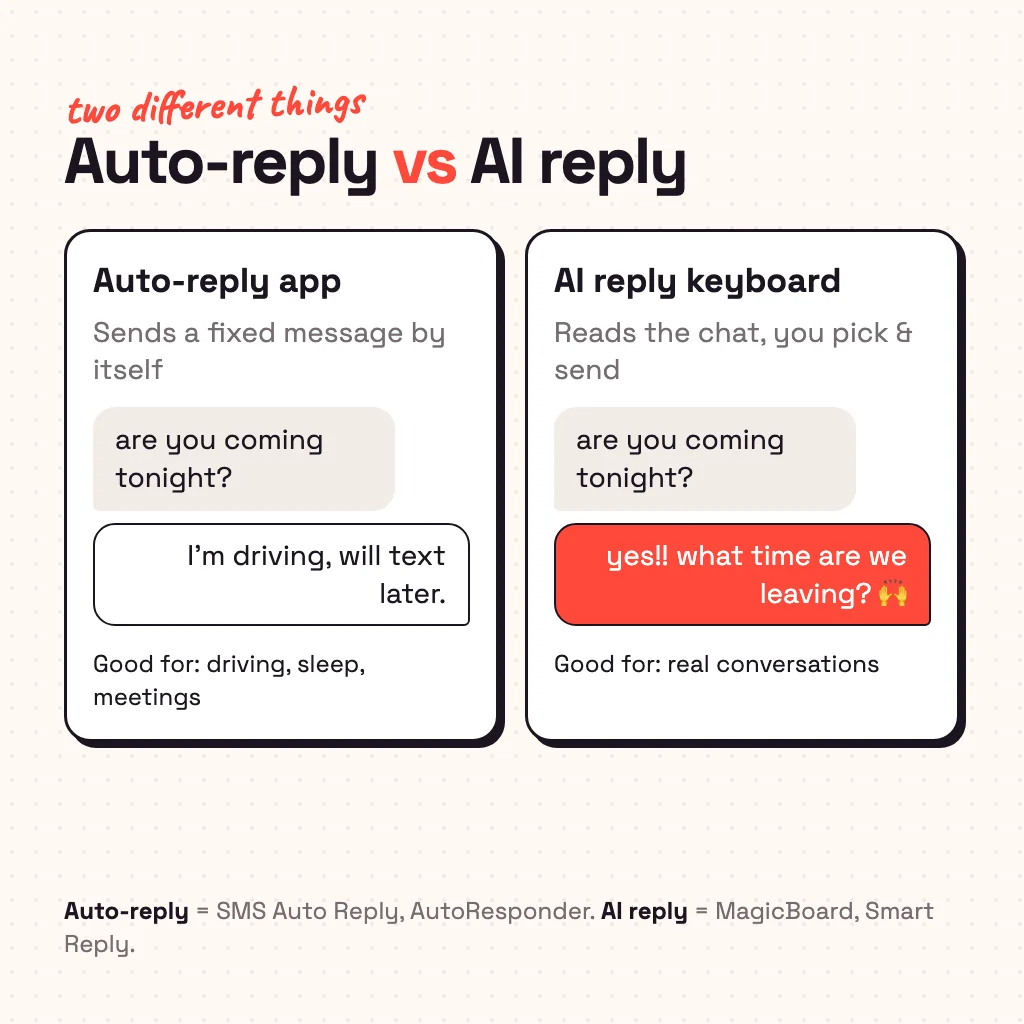
An app that responds to texts for you is either an auto-reply app, which sends a message you set in advance (like "I'm driving, I'll text you later") without you touching the phone, or an AI reply app, which reads the conversation and writes a real answer that you check and send with one tap. On Android, SMS Auto Reply and AutoResponder are the main auto-reply apps; for AI replies that work in every chat app, use an AI keyboard such as MagicBoard, or the Smart Reply suggestions built into Google Messages. Which you need depends on whether you're busy or just stuck for words.
Auto-reply apps: replies while you're busy
Auto-reply apps watch your notifications and answer incoming messages with text you wrote beforehand. You set rules: who gets a reply, when (driving, sleeping, in a meeting) and what it says.
- SMS Auto Reply: profiles for driving, sleep and meetings, schedules, and a block list. It can answer SMS and many chat apps, including WhatsApp, Telegram and Signal.
- AutoResponder for WA: rule-based replies for WhatsApp, triggered by exact words or patterns. Popular with small shops answering "what are your hours?".
- Built in: Android's driving mode and Google Assistant can read messages aloud and let you dictate a reply; on iPhone, a Driving Focus can auto-reply to texts and iMessages (not WhatsApp).
These are reliable for "I'm unavailable" messages. They can't hold a conversation: every reply is one you wrote earlier, and a canned answer to "are you okay??" can go badly.
AI reply apps: an answer written from the chat
AI reply apps read what the other person said and write a reply that fits. You stay in charge: the app suggests, you pick, edit if you want, and send. There are three ways to get this on Android:
- An AI keyboard that reads the chat. Because it's your keyboard, it works in every app you type in. MagicBoard (ours) does this: tap ✨ Reply in WhatsApp, Instagram, Telegram, Messages or Snapchat and it reads the messages on screen and gives you three replies.
- Smart Reply in your messaging app. Google Messages and Android's notification shade suggest short replies ("Sounds good!", "On my way") under a message. Fast, free, but only a few words long and only in some apps.
- Copy-paste into a chatbot. Copy the message, paste it into ChatGPT or Gemini, ask for a reply, copy the answer back. It works anywhere, but it's four app switches per message.
How to get AI to reply to your texts on Android
With MagicBoard the whole setup takes about 20 seconds:
- Install MagicBoard from Google Play and open it.
- Turn it on as your keyboard. The app walks you through the two switches (our how to change keyboard on Android guide shows the same screens).
- Open any chat and tap ✨ Reply. Pick one of the three replies, change a word if you like, and send.
To read the chat without you copying anything, MagicBoard uses Android's accessibility service, only in chat apps and only while it's your keyboard. You switch that on yourself after an explanation in the app. If you'd rather not, copy a message and Reply answers that one instead.
Can an app reply automatically with AI?
Some apps and bots chain the two ideas: an AI writes the reply and sends it without asking you. For a business answering customer questions on the official WhatsApp Business platform, that's normal. For your own chats it's risky: the AI doesn't know your plans, your in-jokes or that your friend is upset, and one wrong automatic answer costs more than the time it saved. Unofficial bots that automate a personal WhatsApp account can also break WhatsApp's terms. The safer setup is AI that drafts and a human who taps send.
Which one should you use?
| If you… | Use |
|---|---|
| Can't look at the phone (driving, sleeping, meetings) | SMS Auto Reply or your phone's driving mode |
| Run a small business on WhatsApp | WhatsApp Business away messages, or AutoResponder |
| Can look, but don't know what to say | An AI reply keyboard like MagicBoard |
| Want a quick "ok 👍" with no setup | Smart Reply in Google Messages |
For WhatsApp specifically, our guide to AI reply to WhatsApp goes deeper, and if you're stuck on a one-word text, here's what to reply when she says hmm.
Is it private?
An auto-reply app needs notification access, which lets it read incoming messages. An AI reply app sends the messages you ask about to an AI server to write the answer. Check that the app only sends text when you ask (MagicBoard sends nothing until you tap Reply, and doesn't store it), that it skips password fields and banking codes, and that it never sends on its own.
Common questions
Is there an app that responds to texts for you?
Yes. Auto-reply apps like SMS Auto Reply send a pre-written message automatically; AI reply apps like MagicBoard write a real reply from the conversation that you send with one tap.
Is there an AI that can reply to my text messages?
Yes. AI keyboards such as MagicBoard read the chat and suggest full replies in any app; Google Messages offers short Smart Reply suggestions.
Can an app auto-reply to WhatsApp messages?
Yes. SMS Auto Reply and AutoResponder for WA send automatic replies on WhatsApp, and the WhatsApp Business app has built-in greeting and away messages.
How do I make my phone reply to texts automatically?
Turn on driving mode (Android) or a Driving Focus (iPhone) for texts, or install an auto-reply app and set a rule with your message.
Is there a free app that writes replies to texts?
MagicBoard is free with 30 AI replies and rewrites to start, then 3 a day. Smart Reply in Google Messages is free but only suggests a few words.
From the studio
Previous Article
Best AI Keyboard for Android: 6 Picks by What You Want AI to Do
Next Article
AI Reply to WhatsApp: How to Get AI to Write Your WhatsApp Replies