AI Reply to WhatsApp: How to Get AI to Write Your WhatsApp Replies
How to use AI to reply to WhatsApp messages: an AI keyboard that reads the chat, WhatsApp Writing Help, a chatbot, or auto-replies for a business.
To get AI to reply to your WhatsApp messages, use an AI keyboard that reads the chat (on Android, MagicBoard writes three replies from the conversation when you tap ✨ Reply), WhatsApp's own Writing Help to rephrase a message you've typed, or copy the message into ChatGPT or Gemini and paste the answer back. All three keep you in control: the AI drafts, you send. Fully automatic AI replies are a business feature, built on the WhatsApp Business platform with tools like ManyChat or Respond.io, and not something to point at your friends and family.
1. An AI keyboard that reads the chat (fastest)
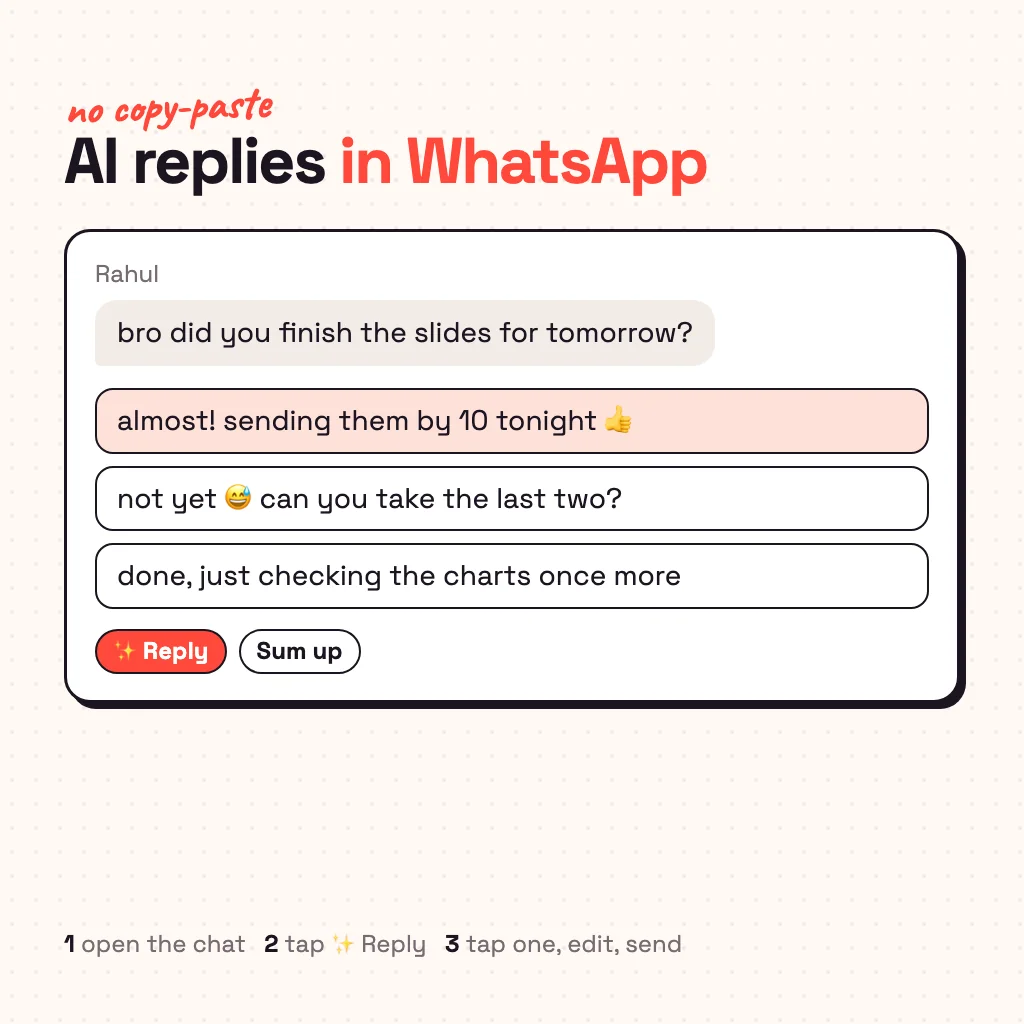
Because a keyboard opens inside WhatsApp, it can help right where you type. Most AI keyboards rewrite what you've already written; a few can write the reply itself. MagicBoard, our AI keyboard for Android, reads the messages on screen when you tap ✨ Reply and gives you three whole replies. Pick one and it goes into the text box; change a word if you like and send.
How to set it up:
- Install MagicBoard from Google Play (Android 9 and newer).
- Turn it on as your keyboard; the app shows the two switches.
- Allow "Reply without copying" when the app explains it. It uses Android's accessibility service to read chat apps only, only while MagicBoard is your keyboard. Prefer not to? Long-press a message, copy it, and Reply answers that one.
- Open a WhatsApp chat, tap ✨ Reply, pick a reply, send.
It also does the rest of the WhatsApp jobs: Sum up turns a long group chat into two or three lines, grammar fix tells you why it changed something, and translate turns your English into the language your friend writes in. Replies learn how you text, so they don't sound like a chatbot. It works the same in Instagram, Telegram, Snapchat and Messages.
2. WhatsApp Writing Help (rephrase what you typed)
WhatsApp has its own AI tool, Writing Help, built on Meta AI. Type a message, tap the pencil icon, and it offers rewrites in a different style, such as more professional, funnier or more supportive, plus proofreading. Meta says it runs on Private Processing, so neither WhatsApp nor Meta can read the text. It's off by default and rolled out first in English in the US and a few other countries, so you may not have it yet.
The limit: Writing Help polishes a message you wrote. It doesn't read the conversation and draft the answer, so it helps with "how do I say this" more than "what do I say".
3. Copy and paste into ChatGPT or Gemini
Long-press the message, copy it, open ChatGPT (or Gemini, or Meta AI's own chat), paste it with a line like "reply to this, casual, short", then copy the answer back into WhatsApp. It works on any phone and costs nothing. It's also slow: four app switches per message, and the chatbot only sees the one message you pasted, not the conversation before it, so replies often miss the point.
4. Automatic AI replies for a business
If you want WhatsApp to answer customers by itself (order status, opening hours, bookings), that's a business setup:
- WhatsApp Business app: free greeting messages, away messages and quick replies, no AI needed.
- WhatsApp Business Platform + a tool: ManyChat, Respond.io, Botpress and similar connect an AI agent to an official business number and answer 24/7.
- Auto-reply apps such as AutoResponder for WA answer from rules you set, using notification access.
Bots that automate a personal WhatsApp account through unofficial means can break WhatsApp's terms and get the number banned. For personal chats, stick to AI that suggests and a human who sends. More on the difference in app that responds to texts for you.
Which way should you use?
| You want to… | Use |
|---|---|
| Answer friends fast, in your own style | An AI reply keyboard (MagicBoard) |
| Polish a message you already typed | WhatsApp Writing Help, or any AI keyboard's rewrite |
| Reply once in a while, no install | Copy-paste into ChatGPT or Gemini |
| Answer customers automatically | WhatsApp Business + ManyChat, Respond.io or similar |
Is it safe to use AI on WhatsApp chats?
WhatsApp messages are end-to-end encrypted between phones, but any AI that writes a reply has to see the messages it's answering. What matters is when and where that text goes. With MagicBoard, nothing leaves the phone until you tap Reply or Sum up, the AI server doesn't store it, password fields are never read, and threads with one-time codes or bank details are skipped. With copy-paste into a chatbot, the text sits in that chatbot's history unless you delete it.
Common questions
Can AI reply to WhatsApp messages?
Yes. An AI keyboard like MagicBoard reads the chat and suggests replies you send with one tap, WhatsApp's Writing Help rephrases what you type, and businesses can auto-reply with AI through the WhatsApp Business Platform.
How do I use AI to reply to WhatsApp messages for free?
MagicBoard gives 30 free AI replies and rewrites to start, then 3 a day. Copy-pasting into ChatGPT or Gemini is free too, just slower.
Does WhatsApp have an AI reply feature?
WhatsApp has Writing Help, which rewrites and proofreads a message you've typed, and Meta AI, which you can chat with. Neither writes the reply to a friend's message for you.
Can AI auto-reply on my personal WhatsApp?
Not safely. Unofficial auto-reply bots on personal accounts risk a ban, and an AI answering friends without you can get things badly wrong. Use AI to draft, and send it yourself.
Does it work on iPhone?
MagicBoard is Android only. On iPhone, use WhatsApp's Writing Help where available or a chatbot with copy-paste.
From the studio
Previous Article
App That Responds to Texts for You: Auto-Reply vs AI Reply on Android
Next Article
What to Reply When She Says Hmm: 30 Replies for Every Kind of Hmm