How to Record a Conversation (iPhone, Android and Phone Calls)
How to record a conversation in person or on a call with iPhone or Android: the built-in apps, where to put the phone, consent laws, and turning it into text.
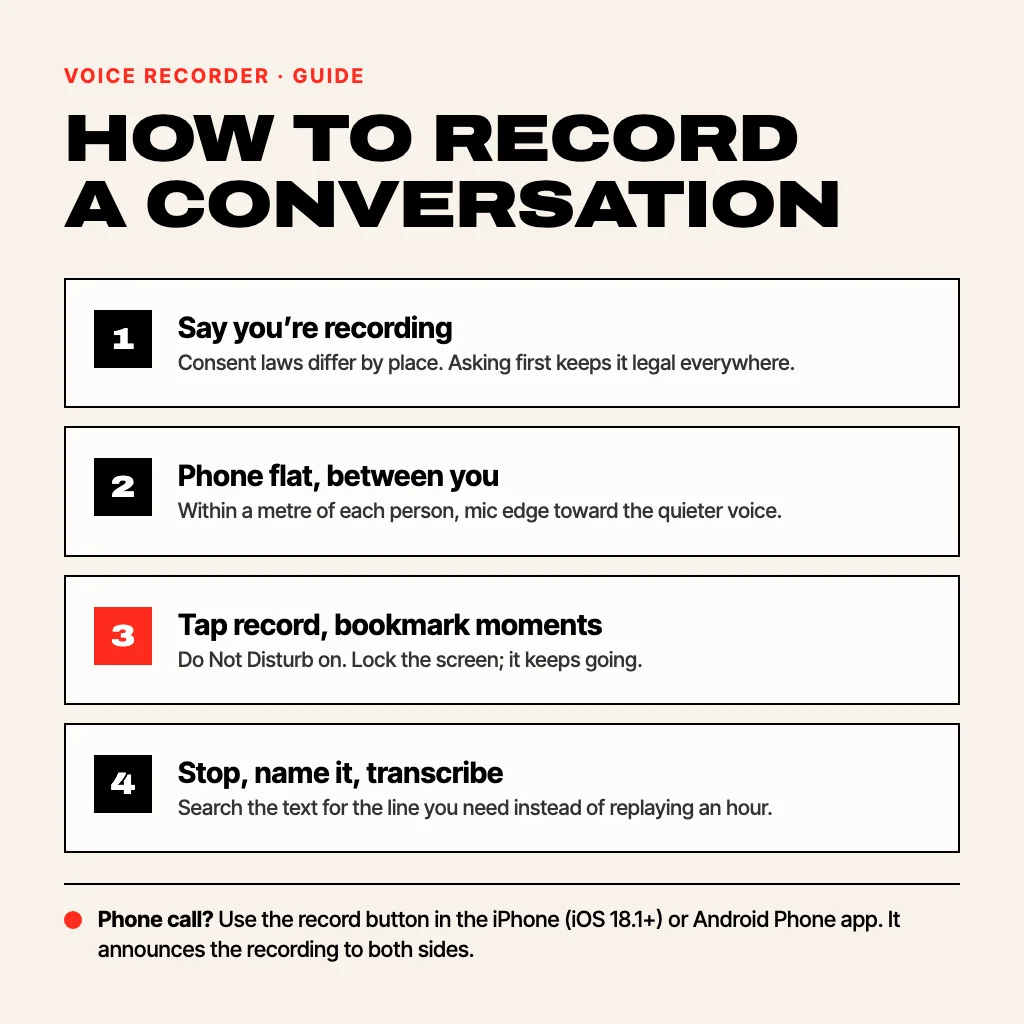
To record a conversation, tell the other person you are recording, open your phone’s recorder (Voice Memos on iPhone, Voice Recorder on Samsung, Recorder on Pixel), lay the phone flat on the table halfway between you with the bottom edge pointing at the quieter speaker, and tap record. For a phone call, use the built-in call recorder: iPhones on iOS 18.1 or later have a record button on the call screen, and Pixel and Samsung phones have one in the Phone app in countries where it is allowed. Both announce the recording to the other side. Whether you may record at all depends on where you and the other person are, so the legal part comes first.
Is it legal to record a conversation?
It depends on the place, and the rule is about consent. This is a general guide, not legal advice:
- United States: federal law and most states are one-party consent: you can record a conversation you are part of without telling anyone. About a dozen states, including California, Florida, Illinois, Maryland, Massachusetts, Montana, New Hampshire, Pennsylvania and Washington, require everyone’s consent. On a call across state lines, follow the stricter state.
- United Kingdom: recording a conversation you are in for your own use is generally allowed; sharing or publishing it can break data protection or privacy law.
- Germany: secretly recording words spoken in private is a criminal offence (§ 201 StGB). Ask first, every time.
- France and Spain: recording private words without consent is restricted in France (article 226-1 of the Code pénal); in Spain you may record a conversation you take part in, but publishing it without consent can breach privacy law.
Two rules hold almost everywhere: recording a conversation you are not part of is eavesdropping, and saying “I’m recording this so I don’t miss anything” at the start removes the problem. It also makes people speak more clearly.
How to record a conversation in person on iPhone
- Open Voice Memos (it is in the Utilities folder, or swipe down on the home screen and search “voice”).
- Put the iPhone flat on the table, screen up, between the two of you. The main microphone is on the bottom edge, so point that edge at whoever speaks more quietly.
- Tap the red button. You can lock the screen; the recording keeps going and shows a red indicator at the top.
- Tap stop, then tap the title to rename it (“Lease call with Sam, 1 Nov”).
On an iPhone 12 or later with iOS 18, the speech-bubble button in Voice Memos shows a transcript. Our guide to transcribing voice memos covers that step.
How to record a conversation on Android
- Samsung Galaxy: open Voice Recorder and pick Interview mode at the top. It uses the top and bottom microphones for two people facing each other, so lay the phone between you with the top towards one person and the bottom towards the other.
- Google Pixel: open Recorder and tap record. It transcribes as you go, and on recent Pixels it can label who is speaking.
- Other phones: search the app drawer for “record”. If nothing comes up, install a recorder from the Play Store. Our Android recording guide covers each brand.
How to record a phone call
Recording a call is different from recording a room, because ordinary recorder apps can’t hear the other side of a call.
- iPhone (iOS 18.1 or later): during the call, tap the record button at the top left of the call screen. Everyone on the call hears that it is being recorded. When you hang up, the audio and a transcript are saved in the Notes app, in a Call Recordings folder.
- Pixel and phones that use the Google Phone app: tap Record during the call, or turn on automatic recording in Phone › Settings › Call recording. Both sides hear an announcement. It only appears in countries where call recording is allowed.
- Samsung: in the Phone app, tap the three dots during the call and choose Record call, or set it to record automatically in Phone settings › Record calls.
- WhatsApp, Zoom or a phone with no call recorder: WhatsApp has no record button. Put the call on speaker and record it with a second device next to the phone, after telling the other person. Zoom, Teams and Google Meet have their own record buttons, which notify everyone in the meeting.
Since Android 10, third-party apps from the Play Store can no longer record both sides of a call, so the Phone app’s own button is the reliable way.
Where to put the phone for a clear recording
- Close beats loud. Within about a metre of each speaker is enough. Beyond two metres, the room’s echo starts to drown out the voices.
- Flat on a soft surface. A folded napkin or notebook under the phone stops table knocks and cup clinks from booming in the recording.
- Away from noise. In a café, pick a corner table away from the coffee machine and speakers. If you can’t avoid noise, a noise remover can clean it up afterwards; see how to remove background noise from audio.
- Turn on Do Not Disturb. Notification sounds and vibration get into the recording.
- Test for ten seconds. Record a few words from each person, play it back, then start for real.
Turn the recording into text
Most of the time you don’t need the audio, you need the one sentence where someone agreed to a price or a date. A transcript lets you search for it instead of scrubbing through an hour. Pixel’s Recorder, Galaxy AI phones and Voice Memos on recent iPhones do it built in; for other phones see how to transcribe a voice recording to text.
A recorder made for conversations
Voice Recorder: Transcribe AI is our app for this, on Android and iPhone:
- Bookmarks while recording. Tap the bookmark button when someone says something important, and jump straight to those moments later.
- Keeps recording with the screen off, so you can put the phone face down and stop looking at it.
- Transcribes on the phone with the speech recognition built into Android and iOS, so the conversation isn’t uploaded anywhere, and the transcript is searchable.
- Clean voice removes café and street noise, and AI summaries turn a long meeting into a few lines.
Recording, playback, trimming and folders are free. Transcription, Clean voice and the other Pro tools come with three free tries, then Voice Recorder Pro at $3.99 a month or $19.99 a year in the US, which also adds summaries. For classes, our guide to recording lectures on your phone goes deeper.
Common questions
Can I record a conversation without the other person knowing?
In one-party consent places, such as most US states, you can legally record a conversation you are part of without saying so. In all-party consent states and countries like Germany, you can’t. Recording people when you aren’t in the conversation is illegal almost everywhere. Telling people is the safe default.
Does the other person know when I record a phone call?
With the built-in recorders, yes. iPhone call recording plays an announcement to everyone on the call, and the Google Phone app announces that the call is being recorded.
What is the best way to record two people talking?
One phone, flat on the table, halfway between them, within a metre of each. On Samsung, Interview mode is made for this. If one voice is much quieter, move the phone closer to that person rather than turning up the volume later.
How long can my phone record a conversation?
Hours, if storage and battery allow. At standard voice quality an hour is roughly 40 to 60 MB, so plug the phone in for anything longer than two hours.
Can I record a WhatsApp call?
WhatsApp has no built-in call recorder, and phone apps can’t capture its audio. Put the call on speaker and record it with a second phone or a laptop, after telling the other person.
From the studio
Previous Article
Meilleur clavier IA Android : 6 claviers comparés selon ce que vous voulez faire
Next Article
SwiftKey Alternative for Android: 6 Keyboards Worth Switching To