How to Send a Voice Memo (iPhone, Android, Text and Email)
How to send a voice memo by text, iMessage, email or WhatsApp on iPhone and Android, plus what to do when the recording is too big to send.
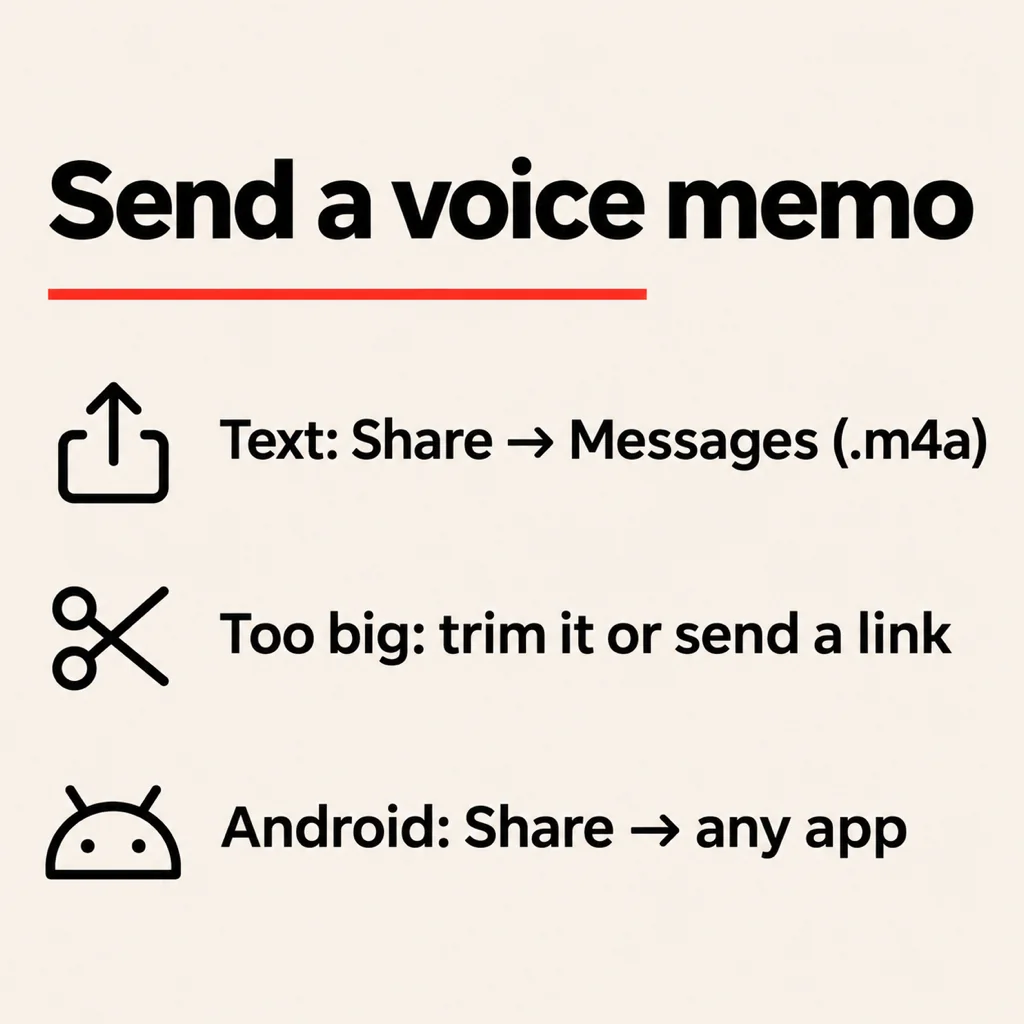
To send a voice memo on iPhone, open the Voice Memos app, tap the recording, tap the ⋯ (More) button and choose Share. Pick Messages, Mail, WhatsApp or AirDrop, choose the person and tap send. The memo goes as an .m4a audio file that plays on iPhones, Android phones and computers. On Android the steps are the same idea: open your recorder app, long-press or open the recording, tap Share and pick the app. The rest of this guide covers each route, what to do when the file is too big, and the difference between a voice memo and a voice message.
Voice memo or voice message: which one do you want?
These get mixed up, and they work differently:
- A voice memo is a recording you already made in a recorder app (Voice Memos on iPhone, Recorder or Voice Recorder on Android). You send it as a file, and it stays in your app.
- A voice message is recorded inside the chat itself (iMessage, WhatsApp, Instagram, Snapchat). It never exists as a separate file on your phone.
If you need to record something first and send it later, or send the same clip to several people, use a memo. If you just want to talk instead of typing, a voice message is quicker.
How to send a voice memo by text on iPhone
- Open Voice Memos and tap the recording you want.
- Tap ⋯ (More), then Share.
- Tap Messages, type the contact's name and tap the send arrow.
To another iPhone it goes over iMessage (blue bubble) and arrives as a playable audio file. To an Android phone it goes as MMS (green bubble) or RCS, and MMS has a small size cap set by the carrier, often around 1 MB. A minute or two of speech usually fits; a long lecture won't. If it fails, see the "too big" section below.
Messages has no button to attach an existing memo from inside the chat, so start from Voice Memos as above. If you'd rather record something new right in the conversation, tap + → Audio and speak: that sends a voice message, not a memo.
How to send a voice memo by email
In Voice Memos, tap the recording, then ⋯ → Share → Mail (or Gmail, Outlook). The memo is attached as an .m4a file. Most email services cap attachments at 20 to 25 MB. In Apple Mail, a bigger file triggers Mail Drop, which uploads it to iCloud and sends a download link that stays valid for 30 days. Gmail does the same with a Google Drive link.
How to send a voice memo on WhatsApp
In Voice Memos tap ⋯ → Share → WhatsApp, pick the chat and send. It arrives as an audio file the other person can play inside WhatsApp, and WhatsApp accepts files far larger than MMS, so it's the easiest route for long recordings to someone on Android. From inside WhatsApp you can also tap + → Document and browse to the file if you saved it to Files first.
Instagram and Snapchat are different: their chats only send voice messages you record in the chat by holding the microphone. To share an existing memo there, send it another way or post it as audio inside a video.
How to send a voice memo on Android
Android phones ship with different recorders, but the share step is the same:
- Samsung Voice Recorder: long-press the recording, tap Share, choose the app.
- Google Recorder (Pixel): open the recording, tap Share and choose to send the audio file, a link, or the transcript text.
- Any recorder: if there's no share button, open the Files app, go to the Recordings or Music folder, long-press the file and tap Share.
To text it, pick Messages in the share sheet. Over RCS (chat features on) larger files go through; over plain MMS the same carrier cap as on iPhone applies.
What to do when a voice memo is too big to send
- Trim it. In Voice Memos tap the recording, ⋯ → Edit Recording, tap the trim icon and drag the handles to keep only the part you need. Silence at the start and end adds up.
- Record smaller next time. In iPhone Settings → Apps → Voice Memos, set Audio Quality to Compressed instead of Lossless. A Lossless memo can be ten times the size.
- Send a link instead of the file. Save the memo to iCloud Drive or Google Drive, then share the link. Size stops mattering, and the person can stream it without downloading.
- Use a different app. WhatsApp, email with Mail Drop, or AirDrop between Apple devices all carry much larger files than a text message.
If the problem is a video rather than audio, the same limits apply; we covered them in how big of a video can you text.
How to send a voice memo to your computer
- Mac: turn on Voice Memos in iCloud (Settings → your name → iCloud) and the memo appears in the Voice Memos app on your Mac. AirDrop also works in seconds.
- Windows: share the memo to Save to Files → iCloud Drive and open it at icloud.com, email it to yourself, or connect the phone and copy it from the recordings folder (Android).
Send the words, not just the audio
Often the person doesn't want to listen to eight minutes of audio; they want the two lines that matter. Sending a transcript (or the transcript plus the file) gets read faster and can be searched later. Our guide to transcribing voice memos shows the free ways to do it on each phone.
This is where Voice Recorder: Transcribe AI, our recorder for iPhone and Android, helps. Every recording has a Share button on the recording itself, in the player, and for several at once from the library's select mode. Export as… lets you choose M4A (free) or WAV for editing software (Pro). Transcripts made on the phone can be shared as a .txt file, with or without timestamps, and summaries can be shared as text. On Android it also takes audio in: share a WhatsApp voice note to Voice Recorder and it lands in your library as a recording you can trim, transcribe and send on.
Recording, playback, trimming, folders and sharing are free. Transcription, Clean voice, WAV export and the other Pro tools come with three free tries, then Voice Recorder Pro at $3.99 a month or $19.99 a year in the US.
Common questions
Why can't I send a voice memo on my iPhone?
Usually the file is too big for a text message to an Android phone (MMS), or you're offline. Trim the memo, switch Voice Memos to Compressed quality, or send it through WhatsApp, email or an iCloud Drive link instead.
Can you send a voice memo to an Android phone?
Yes. Share it from Voice Memos to Messages, WhatsApp or email. It arrives as an .m4a file, which Android phones play without any extra app.
How do I send a voice memo as a voice message?
You can't convert one into the other. A voice message is recorded inside the chat. To send an existing memo, share it as an audio file; it plays almost the same way for the person receiving it.
How long can a voice memo be to send by text?
Over iMessage, very long memos go through. Over MMS to Android, carriers usually cap messages at around 1 MB, which is roughly one to two minutes of compressed speech. Use WhatsApp, email or a cloud link for anything longer.
What is a good app to record and send voice memos?
Voice Memos (iPhone) and Recorder (Pixel) cover the basics. If you also want searchable transcripts you can send as text, noise cleanup and WAV export, Voice Recorder: Transcribe AI does those on the phone; recording and sharing are free.
The short version
Open the memo, tap Share, pick the app. If it bounces, it's almost always size: trim it, record in Compressed quality, or send a link. And when the other person only needs the gist, send the transcript.
From the studio
Previous Article
How to Add Timestamp to Photos (Android, iPhone, Samsung and Already Taken)
Next Article
Truth or Dare Questions for Girlfriend: 70 Cute, Funny and Flirty Ones