How Big of a Video Can You Text? MMS, RCS and iMessage Limits Explained
Text message video limits: MMS is 1 to 3.5 MB depending on carrier, RCS around 100 MB, iMessage compresses instead of capping. What fits, and what to do when it does not.
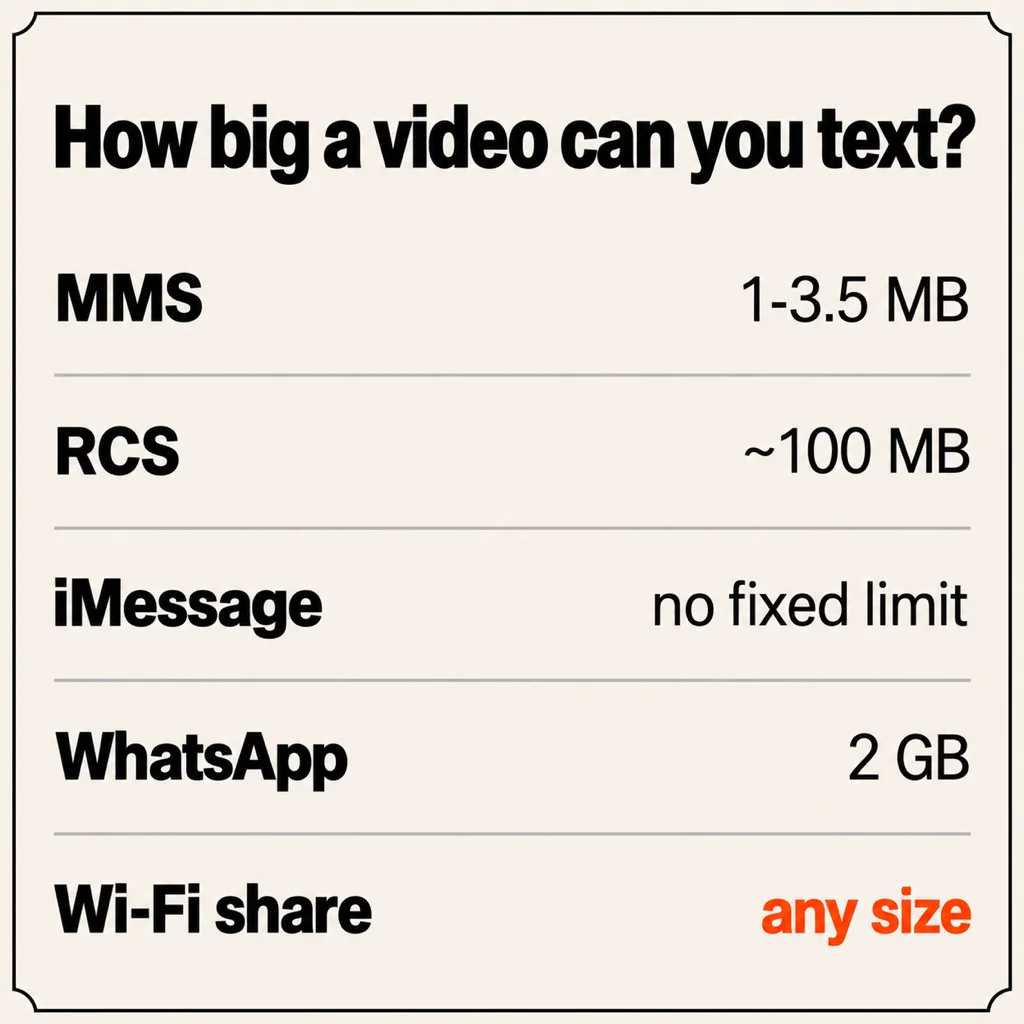
It depends on which kind of text you are sending. A plain MMS can carry roughly 1 MB to 3.5 MB of video, a cap set by your carrier rather than your phone, and that is only a few seconds of 1080p footage. RCS, the newer standard behind Google Messages and iPhone to Android chats since iOS 18, allows around 100 MB. iMessage between two iPhones has no fixed length limit, but it compresses longer videos hard. For anything bigger than a short clip, send a link or move the file over Wi-Fi instead; both are covered below.
How big of a video can you text?
If the message goes out as MMS, which is what happens whenever RCS or iMessage is unavailable, the limit is tiny and depends on the carrier at both ends. Published and commonly observed caps in the US:
- AT&T: about 1 MB per MMS, the smallest of the big three.
- T-Mobile: about 3 MB.
- Verizon: about 3.5 MB, the most generous, but the receiving carrier still has to accept it.
- Prepaid and smaller carriers: usually inherit the limit of the network they run on, often 1 MB to 1.5 MB.
To put that in context, a modern phone recording 1080p at 30 fps produces around 60 MB to 130 MB per minute, so 1 MB is well under a second of original footage and 3.5 MB is two or three seconds. Your phone knows this, which is why it offers to shrink the video first. The result is a blurry, blocky clip at a fraction of the original resolution. It arrives, but it rarely looks like something you would want to keep.
How long of a video can you text on iPhone
Between two iPhones, Messages uses iMessage, and Apple does not publish a length cap. In practice you can attach a video of several minutes and it will send, but Messages re-encodes it to keep the message small. Longer videos are compressed more aggressively, so a two-minute 4K clip arrives as a soft 720p-ish file.
If the other person has an Android phone, the rules change. On iOS 18 and later, with RCS switched on (Settings > Apps > Messages > RCS Messaging) and a carrier that supports it, the green-bubble chat is RCS and videos of up to around 100 MB go through. If RCS is off or unsupported, the iPhone falls back to MMS and the 1 MB to 3.5 MB cap applies again.
What fits in each route from an iPhone, at 60 MB to 130 MB per minute of 1080p/30:
- MMS: a couple of seconds at original quality, or a heavily compressed clip of 20 to 30 seconds.
- RCS: about one minute of 1080p, or 15 to 30 seconds of 4K, with little or no compression.
- iMessage: any length, compressed to fit.
How long of a video can you text on Android
Google Messages uses RCS by default between Android phones, and since iOS 18 with iPhones as well. The practical ceiling is about 100 MB per file. Google Messages may offer to compress a clip near that limit, and it falls back to MMS when RCS is not available for the other person: RCS turned off, an unsupported carrier, or no data connection.
You can see which one you are on: a chat marked "RCS message" or "Chat message" in the compose box is RCS; "Text message" or "MMS" means the small limit applies.
What 100 MB means in footage from a current Android phone:
- 1080p at 30 fps: about 45 seconds to 1 minute 40 seconds.
- 4K at 30 fps (roughly 170 MB to 400 MB per minute): about 15 to 35 seconds.
- 4K at 60 fps or high-bitrate modes: often under 15 seconds.
How to text a video that is too large
Four realistic options, chosen by how far away the other person is and how much quality matters.
1. Send a link instead of the file
Upload the video to Google Photos, Google Drive, iCloud Photos (Share > Copy iCloud Link), OneDrive or Dropbox and text the link. The recipient downloads the original in any browser and quality is untouched; the only cost is upload time and cloud storage.
2. Make sure you are actually on RCS
If a video under 100 MB still fails, the chat has usually fallen back to MMS. Check the compose box label, confirm RCS is on at both ends and both phones have data, then resend.
3. Same room: send it over Wi-Fi
If the other phone (or a laptop) is next to you, the video does not need to travel through a carrier at all. AirDrop handles iPhone to iPhone or Mac. Quick Share handles Android to Android or Windows. For the mixed cases, iPhone to Android, Android to Mac, iPhone to Windows, Beam is our free app for iPhone, Android, Mac and Windows that sends files straight across the Wi-Fi you are both on. There is no size limit and no compression, the transfer is encrypted end to end, and the receiving device checks the file against a SHA-256 hash before saving it. No Wi-Fi nearby? Turn on a hotspot on one phone and join it from the other. Our guide to moving photos and videos from iPhone to Android walks through it step by step, and AirDrop for Windows covers the iPhone to PC case.
4. Compress or trim, as a last resort
If it must go as a text, trim the clip to the part that matters (Photos on iPhone, Google Photos on Android) and let the phone compress it on send. Expect a visible drop in quality; this is for "look at this" moments, not footage anyone wants to keep.
For the bigger picture, including WhatsApp (2 GB per file when sent as a Document) and Telegram (2 GB, or 4 GB on Premium), see how to send large video files without losing quality.
iPhone to Android video quality
The grainy video an Android phone gets from an iPhone is almost always an MMS problem. Before iOS 18, every iPhone to Android message was MMS, so every video was shrunk into a 1 MB to 3.5 MB budget.
With RCS on both sides, videos under about 100 MB now arrive at or close to the original quality. Two things still cause trouble. First, iPhones record in HEVC (H.265) by default, and some older Android phones or messaging apps struggle to play it; switching the iPhone to Settings > Camera > Formats > Most Compatible records in H.264 at the cost of larger files. Second, anything over 100 MB will either be refused or compressed. For those, use a link or a Wi-Fi transfer, both of which deliver the exact original file.
Common questions
Why will my video not send over text?
Most often because the message has fallen back to MMS and the video is over your carrier's 1 MB to 3.5 MB cap. Check whether the chat is marked RCS or iMessage, and if not, send a link or shrink the clip.
How big of a video can you send on iMessage?
Apple does not publish a size cap for iMessage. Long videos send, but Messages compresses them, and the longer the clip the more quality you lose.
What is the max video size for RCS?
About 100 MB per file in Google Messages. Larger videos are compressed or refused, and the chat drops to MMS if RCS is unavailable for the other person.
How many MB is a 1 minute video?
From a modern phone, roughly 60 MB to 130 MB for 1080p at 30 fps, and 170 MB to 400 MB for 4K at 30 fps. Higher frame rates and HDR push those numbers up.
Does texting a video reduce quality?
MMS always does, and iMessage does for longer clips. RCS mostly keeps the original under 100 MB. A link or a Wi-Fi transfer never changes the file.
Can I text a 2 minute video?
Over iMessage, yes, compressed. Over RCS, only if it is under about 100 MB, which a two-minute 1080p clip usually is not. Over MMS, no. Send a link or share it over Wi-Fi instead.
The short version
MMS fits 1 MB to 3.5 MB of video, a few seconds at most. RCS fits about 100 MB, roughly a minute of 1080p. iMessage has no fixed limit but compresses. For anything longer, text a cloud link, or if the other device is in the same room, send the original over Wi-Fi with Beam and skip the limits altogether.
From the studio

Previous Article
Is Android File Transfer Discontinued? Yes: What Happened and What to Use Now
Next Article
Samsung to Mac File Transfer: Every Way That Still Works in 2026