How to Download Video from Chrome on Android
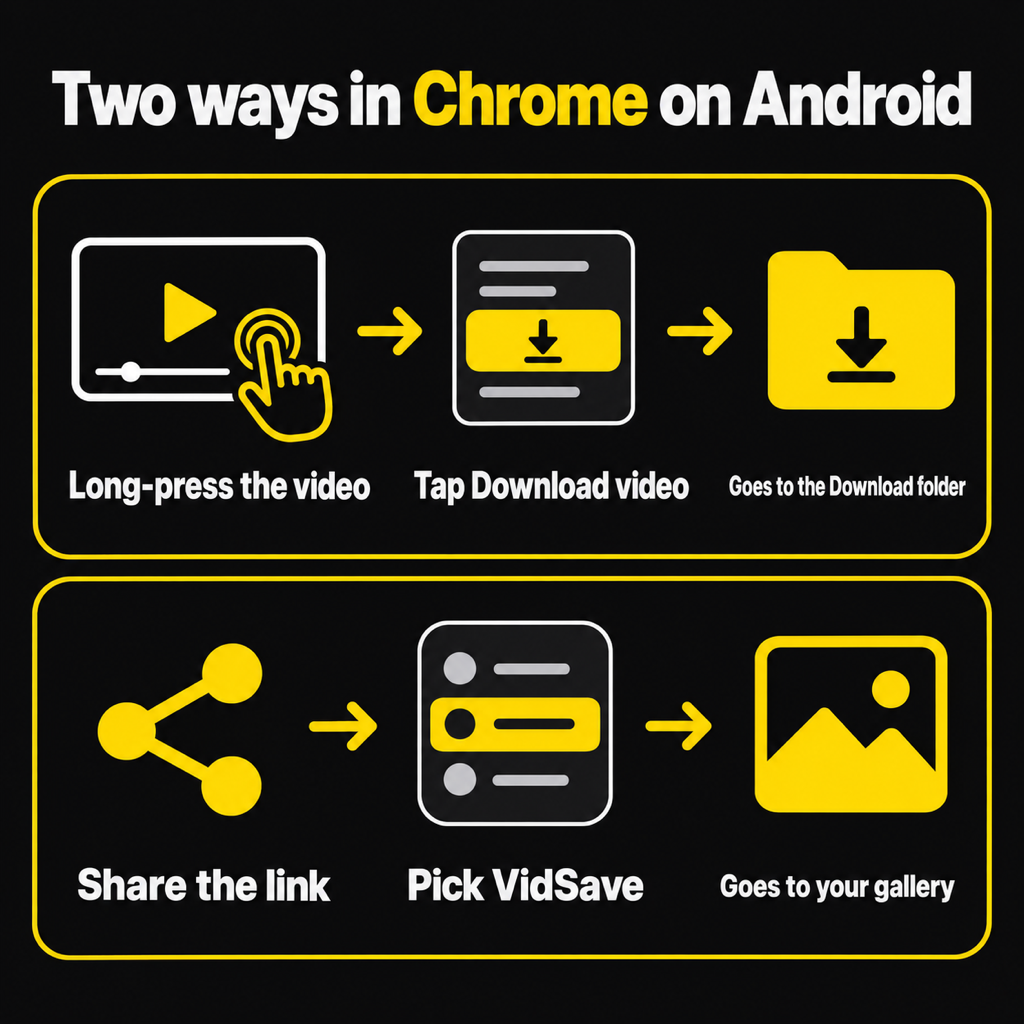
Two ways to save a video from Chrome on Android: the browser download menu, or share the link to an app that saves it to your gallery.
To download a video from Chrome on Android, touch and hold the video or its link and tap Download (Chrome shows Download video or Download link, depending on the page). The file goes to your phone's Download folder. If Chrome offers no download option, tap Share and send the link to a downloader app, which saves it straight to your gallery. Both only work when the video is a real file, not a protected stream.
Method 1: Chrome's own download option
Chrome can save video files by itself. There are two places to find it:
- Touch and hold. Long-press the video or the link to it. If Chrome recognises a downloadable file, the menu includes Download video or Download link. Tap it.
- Open the video on its own. If the link opens a plain black page with just a player, that is the file itself. Tap the three-dot menu in the player (or Chrome's menu at the top) and tap the download arrow.
A bar at the bottom shows the download. When it finishes, tap Open, or find it later in Chrome under the three-dot menu, then Downloads.
The catch: Chrome puts everything in the Download folder. Your gallery usually shows it as a "Download" album, mixed in with every image you ever saved from the web, and some gallery apps hide it until you look under device folders.
Method 2: share the link to a downloader
This works from any page where Chrome shows a video link, and it sends the video to your gallery rather than Downloads:
- Long-press the video link and tap Share (or use Chrome's Share button for the page you are on, when the page itself is the video file).
- Pick VidSave in the share sheet.
- That's it. The download runs in the background while you keep browsing, with progress in your notifications and Open and Share buttons when it is done.
The video is saved in Movies/VidSave, so it appears in your gallery as its own album, separate from your browser downloads. VidSave also checks the file before saving it and tells you plainly if the link is not a video file, instead of leaving a 0 KB file behind.
Why Chrome has no download option for some videos
If you long-press and see no download option at all, the page is not giving Chrome a file. That happens when:
- The video is streamed in chunks. Most large video sites send video in small pieces that the player stitches together while it plays. There is no single file for Chrome to save.
- The player is built in script. The address of the video starts with
blob:, which only means something inside that page. Copying it gets you nothing. - The video is protected. Paid films and series are encrypted. Downloading them for offline viewing is only possible in the service's own app, where they offer it.
In those cases a downloader app cannot help either, and you should be wary of any app that claims it can save "every video on the internet". For a fuller explanation of which links work, see download MP4 from a link on Android.
Chrome download vs a downloader app
- Where it saves: Chrome uses the Download folder; VidSave uses Movies/VidSave and Pictures/VidSave, which the gallery shows as their own albums.
- Before you save: Chrome downloads first and you find out afterwards what you got; VidSave shows a preview with size, length and format first when you paste a link.
- While it runs: both keep downloading if you switch apps. VidSave's notification has Open and Share when it is done.
- Cost: Chrome is free with no ads. VidSave is free with ads (the first save has none), and Remove ads is a single payment.
If Chrome's download option is there and you don't mind digging in the Download folder, use it. If you want videos in your gallery and an honest check of the link, share it to VidSave.
Common questions
Where do Chrome downloads go on Android?
To the Download folder in your phone's internal storage. Open them from Chrome's menu under Downloads, or from the Files app under Downloads.
How do I download a video from Chrome to my gallery?
Share the video link to VidSave, which saves straight to Movies/VidSave so it shows in the gallery. A Chrome download usually also appears in the gallery, inside a "Download" album.
Why does Chrome only download an HTML file?
Because the link was to a page, not to the video file. Chrome saved the page. Look for the link that plays the video on its own.
Can I download videos in Chrome incognito mode?
Yes. Downloads from an incognito tab are saved normally and stay on the phone after you close the tab.
Is there a Chrome extension for downloading videos on Android?
Not in the way desktop Chrome has them: Chrome for Android has no extension store. Use Chrome's own download option or share the link to an app.
The short version
Long-press the video in Chrome and tap Download if it is offered; it lands in Downloads. For your gallery instead, share the link to VidSave. If neither is possible, the video is a stream or protected, and saving it from a link is not possible. The general version of this, for links from any app, is how to download video from a link.
From the studio

Previous Article
How to Download Video from Link on Android
Next Article
How to Save Video to Gallery on Android