Text Match Cut in CapCut: How to Do It (and a Faster Way)
How to make a text match cut in CapCut step by step: page images, clip length, keeping the word aligned, sound, and a one-minute way on Android.
To make a text match cut in CapCut, put 12 to 20 page images on the timeline, shorten each one to about 0.1 to 0.15 seconds, then lay one text layer with your word over the whole stretch so it stays in exactly the same spot while the pages flicker underneath. Give the word a highlight, add a page-flip sound, and export in 9:16. It takes 15 to 30 minutes the first time. A text match cut app does the same thing in about a minute because it builds the pages around the word for you.
What you need before you start
- 12 to 20 page images. Photos of newspaper pages, book pages, magazine spreads, dictionary entries or receipts. Take your own photos or use public-domain scans; avoid copying other people's articles.
- Your phrase. One to three words. Shorter reads better at speed.
- A serif font that looks like print, so the word blends into the pages.
How to do a text match cut in CapCut, step by step
- New project in 9:16. Set the canvas ratio to 9:16 for Reels, TikTok and Shorts before you add anything.
- Add the page images. Import all your page photos to the main track in the order you want them.
- Shorten every clip. Set each image to about 0.1 to 0.15 seconds. That gives 7 to 10 cuts a second, the speed of the trend. Fifteen pages at 0.12 seconds is a 1.8-second match cut.
- Make the pages match. Scale and position each page so its printed text is roughly the same size and the area in the middle of the frame is plain text. This is the slow part, and it's what makes the result look clean.
- Add the word. Add a text layer with your phrase, stretch it across the whole run of page clips, and centre it. Use the serif font and a size close to a headline on the pages.
- Highlight it. Give the text a coloured background (yellow, green or pink highlighter), or add a highlighter-shaped sticker behind it on an overlay track.
- Add sound. A short page-flip or paper sound on each cut makes the edit feel physical. A beat with clear hits also works if you cut on the beat.
- Export in 1080p and post.
Why your CapCut text match cut looks off
- The word jumps. If the text layer is split per clip, it can shift a few pixels. Keep it as one layer across all the pages.
- The pages fight the word. Big headlines or photos behind the word make it hard to read. Use plain text areas and slightly dim the pages.
- It's too slow or too fast. Below 5 cuts a second it looks like a slideshow; above 12 it turns to noise. Aim for 7 to 10.
- It runs too long. Two to four seconds is enough for a hook. Then move on to the real video.
The faster way: a text match cut app
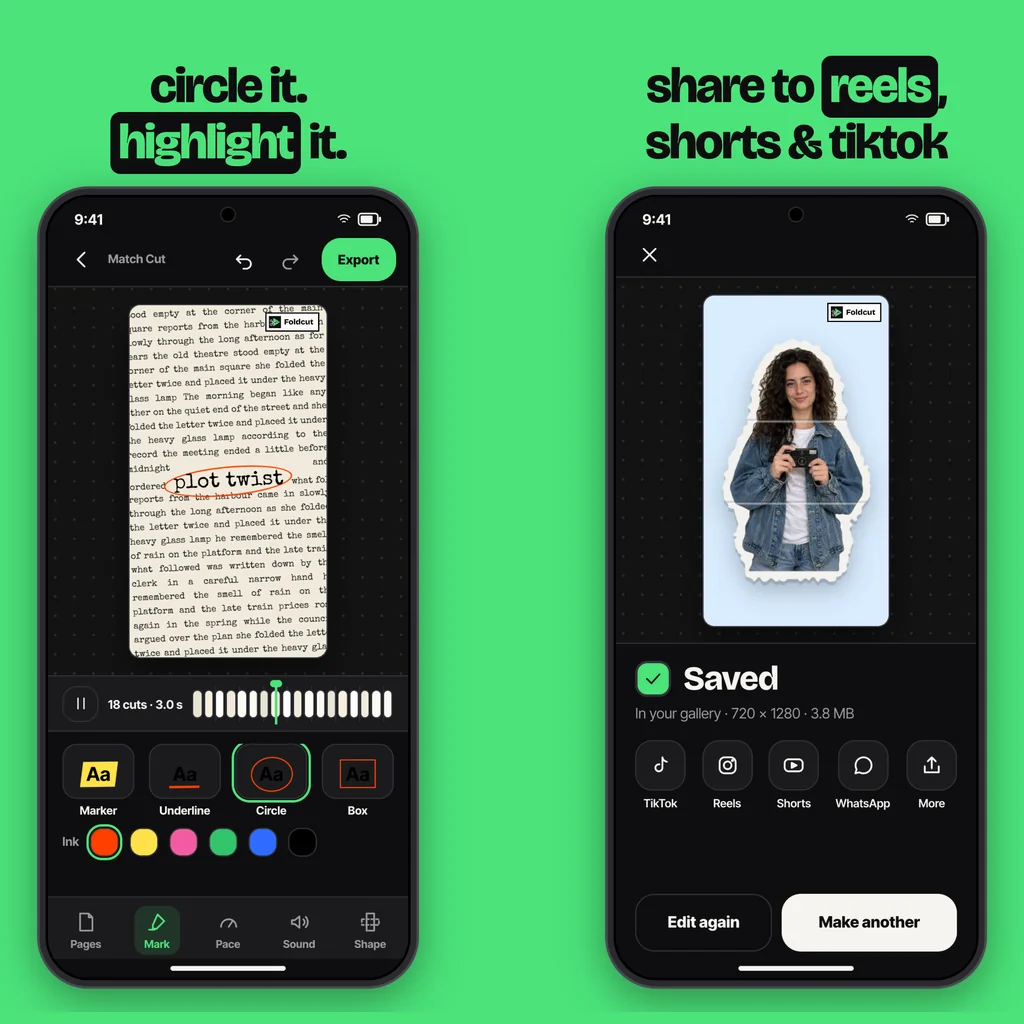
The CapCut method is free and flexible, but every change of phrase means redoing the alignment. A dedicated app generates the pages around your word, so the word sits perfectly on every page and a new phrase takes seconds. In Foldcut (Paper Animator: Text Match Cut on Google Play), our Android app, you type the phrase, tick the page styles (newspaper, book, dictionary, magazine, notebook, typewriter, receipt, search or article), choose a highlighter, underline, circle or box, set the pace, and export with paper sounds already timed to the cuts. Read the full walkthrough in text match cut app, or if you want photos instead of words, see how to make paper animation.
You can also make the match cut in the app and finish the edit in CapCut: export it, then place it at the start of your CapCut project as the hook.
Common questions
Does CapCut have a text match cut template?
CapCut's template library changes often and you'll sometimes find match cut templates there, but they come with their own word or limited pages. For your own phrase, build it manually or use a text match cut app.
How short can a clip be in CapCut?
Short enough for a match cut: about 0.1 seconds per image works, which gives roughly ten cuts a second.
How many pages do I need for a text match cut?
Twelve to twenty for a two to three second hook. Fewer pages repeat too quickly; you can loop them if you're short.
Can I make a text match cut on my phone without CapCut?
Yes. A text match cut app does it directly: type the word, pick the page styles and export.
What is a good app for text match cuts on Android?
Foldcut (Paper Animator: Text Match Cut on Google Play) builds the pages around your word with nine page styles, four marks, adjustable pace and paper sounds. Watermarked videos are free; credits start at $0.99 and Pro is $2.49 a month.
From the studio
Previous Article
Paper Animator Alternative: The Best Options on Android
Next Article
What to Reply When Someone Says Sorry: 50 Replies for Friends, Partners and Work