Text Match Cut App: How to Make the Trend on Android
The text match cut app guide: what the effect is, how to make one on Android in a minute, the settings that make it look right, and what is free.
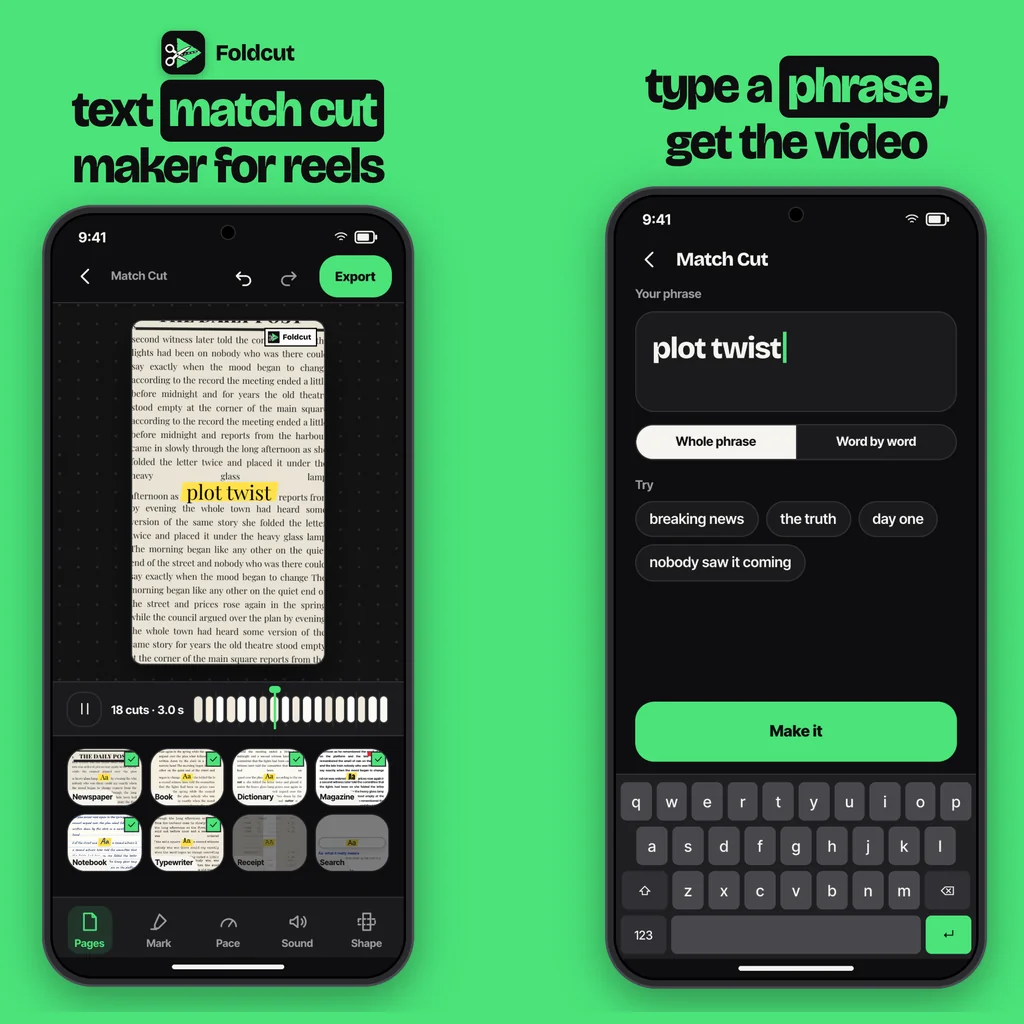
A text match cut app makes the effect for you: you type a word or short phrase, the app places it on a series of different pages (newspaper, book, magazine, dictionary), lines the word up in exactly the same spot on every page, and cuts between the pages several times a second. The word stays still while the world around it flickers, which is why the trend stops the scroll. On Android, a dedicated app does in under a minute what takes 20 minutes of keyframing in a desktop editor.
What is a text match cut?
A match cut is an old film trick: two shots joined so that one shape or movement continues across the cut, like the bone that turns into a spaceship in 2001: A Space Odyssey. The text match cut is the short-video version. One word or phrase appears in the same position, at the same size, on page after page, while everything else changes 6 to 12 times a second. Your eye stays on the word; the pages blur into texture. Creators use it for hooks ("plot twist", "this changed everything"), product names, quotes and intros.
How to make a text match cut on Android
Here are the steps in Foldcut (listed on Google Play as Paper Animator: Text Match Cut), our app. Most text match cut apps follow the same pattern.
- Start a Match Cut. Tap the + button and choose Match Cut, or open one of the Match Cut templates.
- Type your phrase. One to three words reads best. The app sets the word on every page in the same place.
- Pick the pages. Under Pages, tick the styles you want in the mix: Article, Newspaper, Book, Dictionary, Magazine, Notebook, Typewriter, Receipt and Search. Mixing three or four looks richer than one.
- Mark the word. Under Mark, choose a highlighter, underline, circle or box so the word pops off the page.
- Set the pace. Pace sets how many cuts happen each second (6 is the default). Faster feels frantic, slower feels readable.
- Add the sound and shape. Sound adds paper flicks timed to every cut; Shape switches between 9:16, 4:5, 1:1 and 16:9.
- Export. Save the video to your gallery and post it to Reels, TikTok or Shorts.
Settings that make a text match cut look right
- Keep the phrase short. The effect works because the word is instantly readable. Past three words, viewers start reading the pages instead.
- Hold for 2 to 4 seconds. That is long enough to land the word and short enough to use as a hook before the real video starts.
- Pace 6 to 8 cuts a second for most videos. Go to 10 or 12 only for very short, punchy intros.
- Use a marker colour that fits your feed. Yellow highlighter is the classic; green or pink stands out more on a busy page.
- Turn the sound on. A soft paper flick on each cut makes the edit feel physical, even at low volume.
Text match cut app vs doing it in a video editor
You can build a text match cut by hand in CapCut, Premiere or DaVinci Resolve: collect a dozen page images, cut each one to a few frames, and line up the word on every one of them by hand. It works, and it is free, but the alignment is the slow part, and if the word shifts by a few pixels between cuts the effect falls apart. We wrote the full manual method in text match cut in CapCut. A dedicated app generates the pages around your word, so the alignment is perfect every time and changing the phrase takes seconds instead of a redo.
Is there a free text match cut app?
Most text match cut tools let you try the effect free and charge for clean, watermark-free exports. In Foldcut, every page style, mark and setting is open to everyone; free videos carry a small watermark (three a day), and your first clean export is on us. After that you can buy credits (one clean video each, from $0.99) or Pro at $2.49 a month for unlimited clean exports in up to 4K at 60 fps. The same app also makes paper animations from your photos and paper-style news headlines.
Common questions
What app do people use for the text match cut trend?
Creators use browser tools, desktop editors like CapCut or DaVinci Resolve with templates, and dedicated phone apps. On Android, a dedicated app is the fastest because it lines the word up on every page for you.
How many words should a text match cut have?
One to three. The effect relies on the word being readable in a split second while the pages change around it.
How fast should the cuts be?
About 6 to 8 cuts a second for most videos. Faster cuts suit very short hooks; slower cuts make longer phrases easier to read.
Can I make a text match cut without a watermark for free?
Some apps give a free clean export to start. In Foldcut your first clean export is free; after that, watermarked videos stay free (three a day) and clean ones use a credit or Pro.
What is a good text match cut app for Android?
Foldcut (Paper Animator: Text Match Cut on Google Play) makes text match cuts with nine page styles, four ways to mark the word, adjustable pace and paper sounds, and exports in 9:16, 4:5, 1:1 or 16:9. Watermarked videos are free; credits start at $0.99 and Pro is $2.49 a month.
From the studio
Previous Article
What to Reply When Someone Says Good Night: 50 Replies for Friends, Crushes and Partners
Next Article
How to Make Paper Animation (Video, Step by Step, Free)