Paper Animator Alternative: The Best Options on Android
Looking for a Paper Animator alternative? The best options for paper cutouts and text match cuts on Android, in CapCut and in the browser, with prices.
The best Paper Animator alternative depends on where you edit. On an Android phone, a dedicated paper animation app gives you the same torn paper cutouts and text match cuts without a browser or a computer. If you already edit in CapCut, its paper templates and green screen overlays get close for free. And if you work on a desktop, DaVinci Resolve or After Effects plugins give you the most control. Below is what each option is good at, what it costs, and which one to pick.
Why people look for a Paper Animator alternative
Paper Animator made the paper cutout and text match cut look popular, and the name now stands for the whole trend. The common reasons people search for an alternative are practical: they want to make the videos on their phone rather than in a browser, they want an app that lives next to their camera roll and TikTok, they want to try it without buying credits first, or they want more control over the paper, edges and motion than a one-click result gives.
1. Foldcut (Android app)
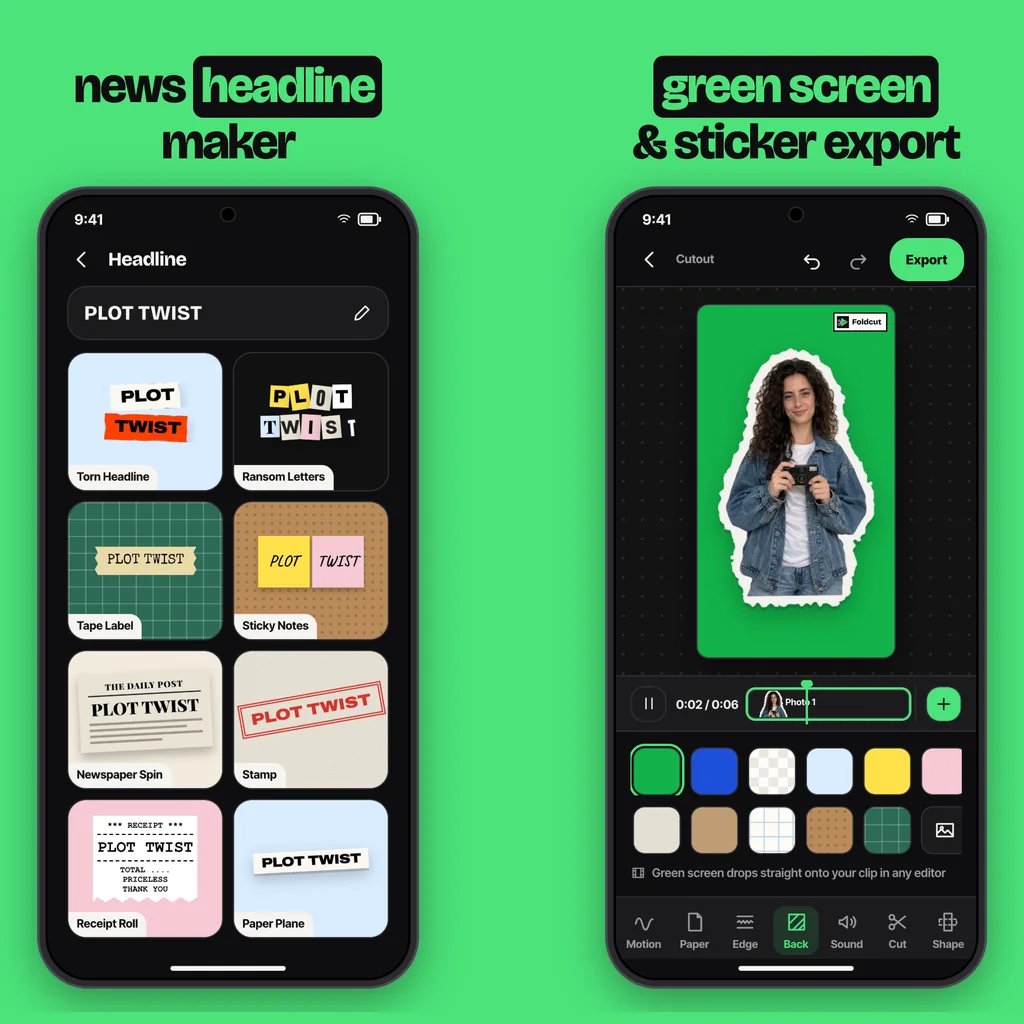
Foldcut, listed on Google Play as Paper Animator: Text Match Cut, is our app, so take this section with that in mind. It makes three kinds of paper video:
- Cutout: pick a photo and the app cuts out the person or object, gives it a torn, scissor or sticker edge, and animates it in (unfold, tear in, peel, pop up and more), holds it, and takes it out (crumple, tear off, blow away). Six paper stocks and backgrounds from cork board to green screen.
- Match Cut: type a phrase and it cuts through nine page styles (newspaper, book, dictionary, magazine, receipt and more) with the word locked in place, highlighted, underlined, circled or boxed.
- Headline: twelve paper title looks, from Torn Headline and Ransom Letters to Sticky Notes, Polaroid Caption and Paper Plane.
Paper sounds (rips, folds, stamps, page flicks) play in time with the motion. Price: everything in the editor is open to everyone; videos with a small watermark are free (three a day) and the first clean export is free. Clean exports use a credit (packs from $0.99, credits never expire) or Pro at $2.49 a month for unlimited exports up to 4K at 60 fps. Best for: making paper videos on an Android phone.
2. CapCut (free templates and overlays)
CapCut has paper animation and crumpled paper transition templates, and creators share paper fold green screen clips you can drop over your footage. It's free and you may already use it. The catch is that templates are fixed: to get your own photo onto torn paper you remove the background, add a stroke, a paper texture and a shadow, then keyframe the motion yourself. Text match cuts mean lining up the word by hand on every page (our guide to text match cut in CapCut walks through it). Best for: people who already edit in CapCut and don't mind the manual work.
3. Browser-based AI paper animation sites
Several websites now generate paper animations from a photo or a prompt, often on a credit system with a free trial credit. They're quick for a one-off on a computer. On a phone, the browser flow (upload, wait, download, move the file to your gallery) is clumsier than an app, and AI-generated motion is harder to control. Best for: occasional desktop use.
4. DaVinci Resolve and After Effects plugins
Desktop editors have paper tear, paper slide and torn edge plugins and templates, some free and most between $15 and $30. They give the most control and the highest quality, and they fit into a longer edit. They need a computer, the editor, and the time to learn the plugin. Best for: YouTubers and editors working on long-form video.
Which Paper Animator alternative should you pick?
- You edit on your Android phone and want it done in a minute: a dedicated app such as Foldcut.
- You live in CapCut and have time: CapCut templates plus the manual paper look.
- You need one video from a laptop: a browser tool.
- You edit long videos on a desktop: a Resolve or After Effects plugin.
New to the look? Start with how to make paper animation for the step-by-step version.
Common questions
Is there a free Paper Animator alternative?
Yes. CapCut is free if you build the paper look by hand, and Foldcut makes watermarked videos free (three a day) with the first clean export free.
Is there a Paper Animator app for Android?
Foldcut, listed on Google Play as Paper Animator: Text Match Cut, makes paper cutouts, text match cuts and paper headlines on Android.
Can I make a text match cut without Paper Animator?
Yes. Use a text match cut app, or build it in CapCut or another editor by aligning the word on a series of page images and cutting between them several times a second.
Should I download a Paper Animator APK or mod?
No. Modded APKs from unofficial sites can carry malware and get no updates. Install apps from Google Play.
What is the best Paper Animator alternative for Android?
Foldcut (Paper Animator: Text Match Cut on Google Play) does cutouts, match cuts and headlines with paper sounds and exports video, green screen and stickers. Watermarked videos are free; credits start at $0.99 and Pro is $2.49 a month.
From the studio
Previous Article
How to Make Paper Animation (Video, Step by Step, Free)
Next Article
Text Match Cut in CapCut: How to Do It (and a Faster Way)