How to Send Files from Android to Mac via Bluetooth
Send a photo or file from an Android phone to a MacBook over Bluetooth: turn on Bluetooth Sharing, pair, share. Plus why it fails and the faster option.
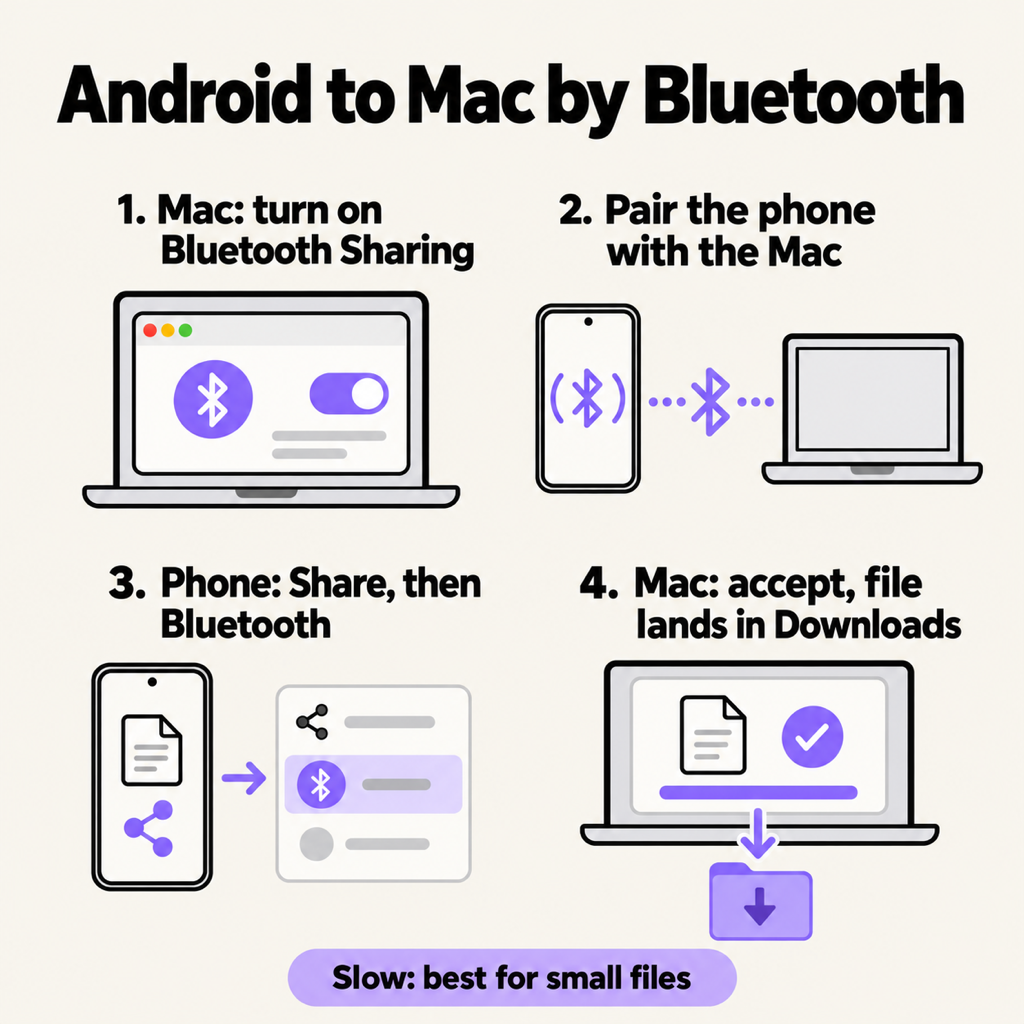
To send a file from Android to a Mac via Bluetooth, turn on Bluetooth Sharing on the Mac (System Settings › General › Sharing), pair the phone with the Mac, then on the phone tap Share › Bluetooth and pick your Mac. Accept on the Mac and the file lands in Downloads. It works without Wi-Fi, a cable or any app, but it is slow: fine for a few photos or a PDF, painful for anything over about 50 MB.
Before you start
- Bluetooth on, on both devices, and the two within a few metres of each other.
- A Mac running a recent macOS. The steps below use the System Settings layout from macOS Ventura onwards; on older Macs the same switch is in System Preferences › Sharing.
- The file saved on the phone. You cannot Bluetooth something that only lives in the cloud.
Step 1: turn on Bluetooth Sharing on the Mac
This is the step almost every failed transfer skips. A Mac with Bluetooth on still refuses incoming files until you allow it.
- Open System Settings › General › Sharing.
- Switch on Bluetooth Sharing.
- Click the ⓘ next to it. Set When receiving items to Ask What to Do, and leave the folder as Downloads unless you want another.
Step 2: pair the phone with the Mac
- On the Mac, open System Settings › Bluetooth and leave the window open so the Mac stays discoverable.
- On the phone, open Settings › Connected devices › Pair new device (Samsung: Settings › Connections › Bluetooth).
- Tap your Mac's name. Both screens show the same six-digit code; confirm it on both.
You only pair once. Next time, skip straight to step 3.
Step 3: share from the phone
- Open the photo in Google Photos or Gallery, or the file in the Files app.
- Tap Share. If Bluetooth is not in the first row, scroll the list of apps or tap More; on Pixel phones it is further down, after Quick Share.
- Tap Bluetooth, then your Mac.
Step 4: accept on the Mac
The Mac shows an Incoming File Transfer notice. Click Accept, and the file appears in your Downloads folder when the progress bar finishes. You can send several photos at once by selecting them all before tapping Share.
Bluetooth from Android to Mac not working?
- "Sending failed" or the Mac never asks: Bluetooth Sharing is off. Go back to step 1.
- The Mac does not appear in the phone's list: keep the Mac's Bluetooth settings open while you look, and make sure the two are paired, not just "seen".
- It stops halfway: move the devices closer and keep the phone's screen on. Bluetooth drops on long transfers.
- The file type is refused: some Android versions will not send certain types over Bluetooth. Zip it, or use one of the faster options below.
- Still nothing: remove the pairing on both devices, restart Bluetooth on each, and pair again.
How fast is Bluetooth file transfer?
Slow. Phone-to-Mac Bluetooth usually manages somewhere around 100 to 300 KB a second in practice. That means a single photo in a few seconds to half a minute, a 50 MB video in several minutes, and a 1 GB video in the best part of an hour, if the connection holds that long. Bluetooth was designed for headphones and keyboards, not files.
The faster way without a cable: Wi-Fi
If you are on Wi-Fi, a local sharing app sends the same file many times faster, with no pairing and no size limit. Beam is ours: install it on the phone from Google Play and on the Mac from beam.riekapps.com. After that, sending looks exactly like the Bluetooth steps, minus the waiting: tap Share › Send with Beam, tap your Mac, and the file is in Downloads. It is encrypted, it checks every file before saving it, and a big video that gets interrupted resumes where it stopped. No Wi-Fi around? Turn on the phone's hotspot and join it from the Mac; a local transfer does not use mobile data.
For the cable options, including what replaced Google's old app, see Android File Transfer for Mac.
Common questions
Can I send files from Android to a MacBook with Bluetooth?
Yes. Turn on Bluetooth Sharing on the MacBook, pair the phone once, then use Share › Bluetooth on the phone. It works on MacBook Air and MacBook Pro alike.
Where do Bluetooth files go on a Mac?
The Downloads folder, unless you changed the folder in the Bluetooth Sharing options.
Can I send files from Mac to Android over Bluetooth?
Yes, with the Bluetooth File Exchange app in Applications › Utilities: open it, choose the file, then choose your phone. The phone asks you to accept.
Can I use Quick Share between Android and Mac?
Not officially; Quick Share has no macOS app. See Quick Share on Mac for the alternatives.
Is Bluetooth file transfer safe?
Between paired devices with Ask What to Do switched on, yes: nothing arrives without you accepting it. Turn Bluetooth Sharing off again when you are done if you share the Mac.
The short version
Bluetooth Sharing on, pair once, Share › Bluetooth, accept. It is fine for small files. For anything bigger, use Wi-Fi with Beam: the same tap-and-send, much faster.
From the studio

Previous Article
Android File Transfer for Mac: Why It's Gone and What to Use Instead
Next Article
Group Phone Games: 15 Games to Play With Friends in the Same Room