How to Add Captions to Video Automatically (Phone, TikTok, Reels, YouTube)
How to add captions to video automatically: the fastest way on your phone, built-in auto captions on TikTok, Reels and YouTube, and how to make them accurate.
To add captions to a video automatically, run it through a speech-to-text caption tool: the tool listens to the audio, writes every word with its timing, and puts the words on screen as the person speaks. On a phone, import the video into a caption app (or use the auto-caption button in TikTok, Instagram or YouTube), check the few words it got wrong, pick a caption style, and export. The whole job takes a minute or two instead of the hour it takes to type and time captions by hand.
Why add captions to your videos at all
Most short videos are watched with the sound off: on a bus, in bed next to someone sleeping, at work. Without captions those viewers scroll past in the first second. Captions also help people who are deaf or hard of hearing, people watching in their second language, and anyone in a noisy place. And on TikTok, Reels and Shorts, word-by-word captions with the spoken word highlighted have become the look viewers expect from talking videos.
How to add captions to video automatically on your phone
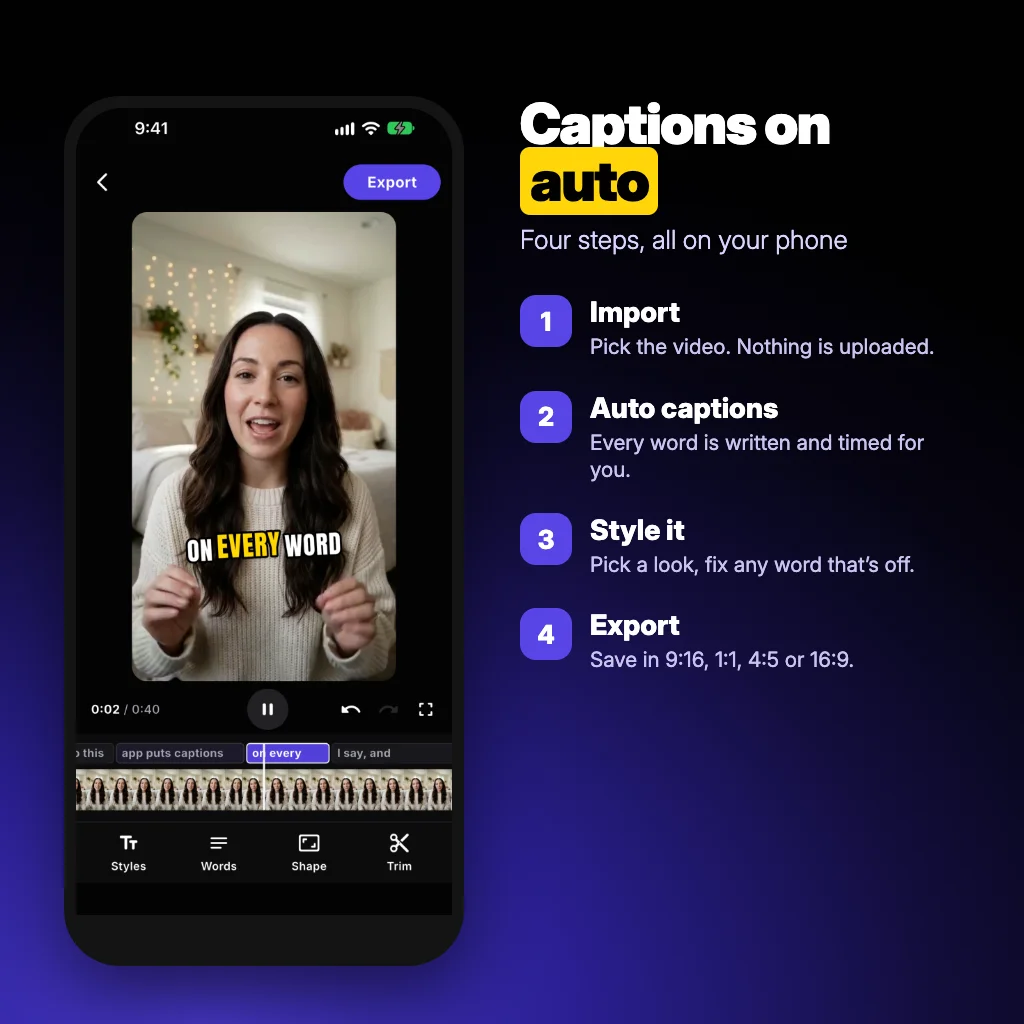
A dedicated caption app gives you the most control, because it burns the captions into the video file itself, so they show up the same everywhere you post. The steps are the same in most apps; here they are in Auto Captions: AI Subtitles, our app:
- Import the video. Tap Create, then Import, and pick a clip where someone speaks.
- Let it caption. The app listens to the speech and writes every word with its exact timing. It detects the language on its own (21 languages, including English, Spanish, German, French, Portuguese and Italian).
- Check and style. Play it back. Tap Words to fix a misheard word, Styles to pick a look, Shape to switch to 9:16, 1:1, 4:5 or 16:9, and Trim to cut the start or end.
- Export. The captioned video saves to your gallery, ready to share to TikTok, Instagram or YouTube. You can also save the captions as an .SRT file.
Speech recognition runs on the phone itself, so your video is never uploaded to a server.
How to add auto captions on TikTok
TikTok can caption a video while you edit it. Record or upload the clip, then in the editor tap Captions in the tool bar on the right. TikTok transcribes the speech, and you can tap the text to correct words before posting. Two limits: you can't add captions to a video that is already posted, and the caption look is TikTok's own, so they won't follow the video if you post it somewhere else.
How to add auto captions to Instagram Reels
In the Reels editor, open the text or sticker options and choose Captions; Instagram writes the speech as an editable caption you can restyle and move. Instagram also has an auto-generated captions setting that viewers can turn on, but those only appear for people who enable them. If you want every viewer to see captions, put them in the video (with the Captions sticker or a caption app) rather than relying on the viewer setting. Instagram moves these buttons between app versions, so look for the "CC" or "Captions" label.
How to add captions to YouTube videos automatically
YouTube generates captions for most uploads in the languages it supports. Open YouTube Studio, go to Subtitles, select the video, and you'll see the automatic track once it's ready. Open it to fix names and technical words, then publish your edited version. These are closed captions: viewers switch them on with the CC button. For Shorts that most people watch muted, burned-in captions do better, because they are always visible.
Burned-in captions or closed captions?
- Burned-in (open) captions are part of the picture. Everyone sees them, on every platform, with your styling. This is what short-video creators use.
- Closed captions are a separate text track (often an .SRT file) that viewers can turn on or off. They suit YouTube, course platforms and longer videos, and search engines can read them.
If you're unsure, do both: export the video with burned-in captions and keep the .SRT file for platforms that accept a caption upload.
How to make automatic captions more accurate
- Clean audio beats everything. Hold the phone closer, turn off music and fans while you record, and add background music after captioning, not before.
- Check names, brands and numbers. These are the words speech recognition gets wrong most often. A 60-second clip usually needs two or three fixes at most.
- Let it detect the language, or set it if a video mixes two languages.
- Keep lines short. Two to four words at a time reads faster on a phone than a full sentence across the screen.
Which caption style gets watched
For talking videos, the style that dominates TikTok and Reels is bold, word-by-word captions in the lower middle of the frame, with the word being spoken highlighted, often in yellow or green. Keep the text away from the bottom edge, where the platform's buttons and description cover it, and away from faces. Pick one style per account so viewers recognise your videos.
Auto Captions: AI Subtitles is built for exactly this: word-by-word captions, nine styles made for TikTok, Reels and Shorts, any colour you like, and no per-minute credits or length limits. Your first video is free with a small watermark; Pro removes the watermark and allows unlimited videos ($3.99 a week with a 3-day free trial, or $29.99 a year). It's on Android now, with the iPhone version on the way.
Common questions
Can I add captions to a video automatically for free?
Yes. TikTok, Instagram Reels and YouTube all have free automatic captions inside their own apps. Caption apps usually let you try a video free; paid plans remove watermarks and limits.
How accurate are automatic captions?
With clear speech and little background noise, modern speech recognition gets almost every word right. Expect to fix names, brand words and numbers, and a few more words when there is music or several people talking.
Do automatic captions work in other languages?
Yes. Most tools support many languages, and some detect the language on their own. Check the tool's list before recording; languages with less training data come out less accurate.
How do I add captions to a video that's already posted on TikTok?
You can't edit captions into a posted TikTok. Download the video, caption it in an app, and repost it, or add captions before posting next time.
What is a good app to add captions to videos automatically?
Auto Captions: AI Subtitles writes word-by-word captions on the phone in 21 languages, with nine styles and export in 9:16, 1:1, 4:5 or 16:9. The first video is free with a watermark; Pro is $3.99 a week or $29.99 a year.
From the studio
Previous Article
Application plan de table mariage gratuit : 8 outils comparés (2026)
Next Article
What to Reply When Someone Says Good Morning: 50 Replies for Friends, Crushes and Work