How to Share Location Coordinates (Android, iPhone, WhatsApp and Google Maps)
How to share location coordinates from Google Maps, iPhone and WhatsApp, as plain numbers or a map link, and what to send when there is no address.
To share location coordinates, drop a pin on the spot, copy the latitude and longitude (for example 48.85837, 2.29448) and paste them into any message, or send a map link that carries those same numbers. In Google Maps, press and hold the place, tap the coordinates in the search box to copy them, then paste. On iPhone, drop a pin in Apple Maps and copy the coordinates from the place card. Plain numbers work in every app and every country; a map link is easier for the other person to open. Below are the exact steps per phone and app, and which format to send when.
Numbers, map link or live location: which should you send?
- Plain coordinates (
48.85837, 2.29448): best for a field, a trailhead, a farm gate, a drone spot or anything a delivery app can’t find. Any map app can read them, and they survive copy and paste, SMS and email. - A map link: one tap opens the pin. Good for friends who just need to get there. It needs a data connection to open.
- Live location: for someone already on their way to you. It updates as you move, and it stops after the time you set.
If in doubt, send both the numbers and the link in one message. If the link breaks, the numbers still work.
How to share coordinates from Google Maps on Android
- Open Google Maps and press and hold the exact spot until a red Dropped pin appears.
- The coordinates show in the search box at the top. Tap them to copy, or swipe up the Dropped pin card to see them.
- Paste into your message. Or tap Share on the card to send a Maps link instead.
To share where you are standing rather than a spot on the map, tap the blue dot first, then copy or share in the same way. Our guide to finding coordinates on Google Maps covers the computer version and reading the numbers.
How to send location coordinates on iPhone
- In Apple Maps, press and hold the spot to drop a pin, or tap the blue dot for your current location.
- Swipe up the place card. The latitude and longitude are listed under the details.
- Press and hold them to copy, or tap Share to send the pin through Messages, Mail or another app.
Google Maps on iPhone works the same way as on Android: press and hold, then copy the coordinates from the Dropped pin card.
How to share location coordinates on WhatsApp
WhatsApp’s Location attachment sends a map pin, not text. That is fine for a friend in a city, but the person can’t copy exact numbers from it into another app. For exact coordinates:
- Copy the coordinates from Google Maps or Apple Maps as above.
- Paste them into the chat as a normal text message.
- On most phones the receiver can tap the numbers or a Maps link to open them.
For someone driving to you, use Attach → Location → Share live location and pick how long it runs.
How to turn coordinates into a link anyone can open
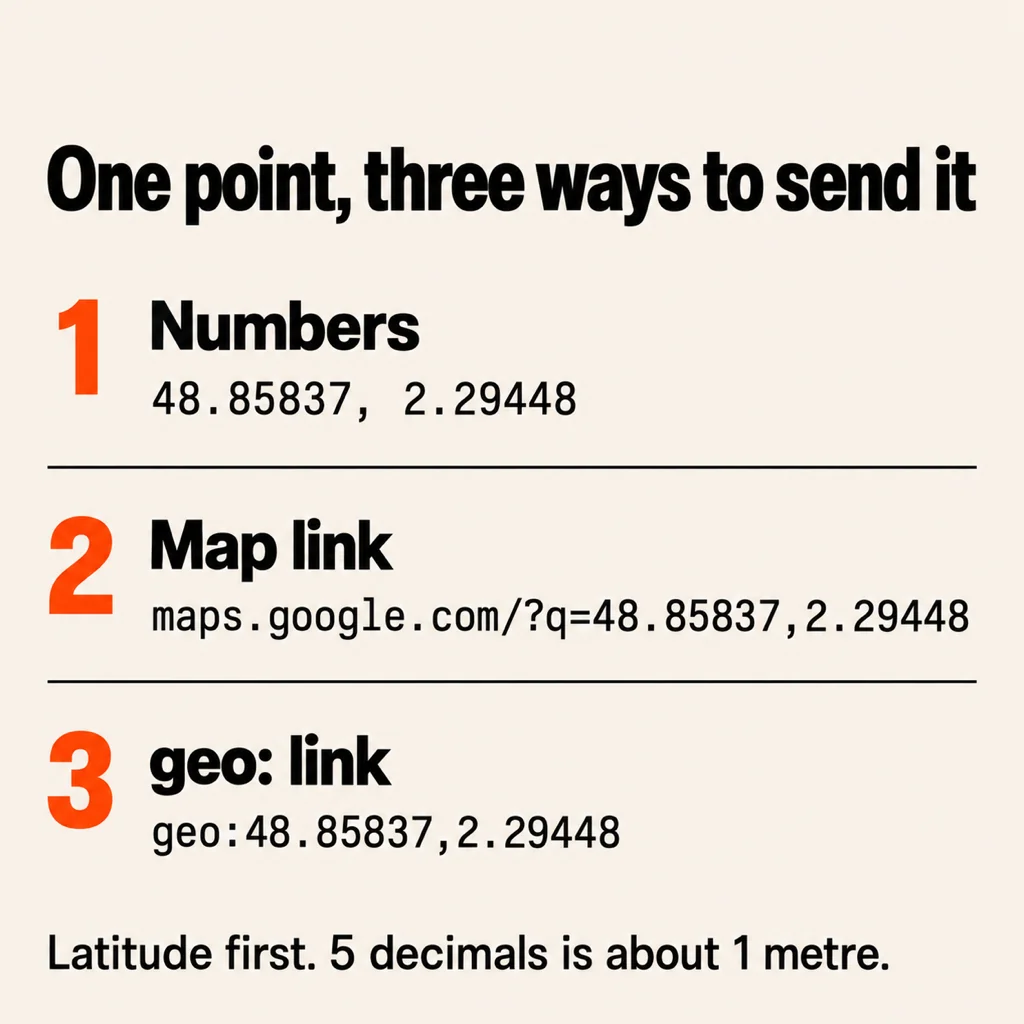
If you only have numbers, you can build a link yourself. Put latitude first, a comma, then longitude, with no spaces:
- Google Maps link:
https://www.google.com/maps/search/?api=1&query=48.85837,2.29448. This opens a pin in a browser or in the Maps app on Android and iPhone. The short formmaps.google.com/?q=48.85837,2.29448works too. - geo: link:
geo:48.85837,2.29448. On Android it opens whichever map app the person uses, but some chat apps don’t make it tappable.
How to share GPS coordinates without internet
GPS works without mobile data. Your phone can still find its position in a forest or at sea, but the map tiles may not load. To send a location from somewhere with no signal for data:
- Open a coordinates app or your map app (with offline maps downloaded) and wait for the accuracy to settle under 10–20 m.
- Copy the numbers and send them by SMS, which often gets through on one bar when data doesn’t.
- For an emergency call, read the numbers out: latitude, then longitude, digit by digit.
Mistakes that send people to the wrong place
- Swapped order. Latitude (north–south) comes first.
2.29448, 48.85837lands in the Indian Ocean, not Paris. - Lost minus sign. West longitudes and south latitudes are negative in decimal form. New York is
40.7128, -74.0060; drop the minus and the pin lands in Central Asia. - Mixed formats.
48°51'30"N(degrees, minutes, seconds) and48.8583(decimal) are the same place written differently. Don’t combine them. Our GPS coordinates format guide shows how to convert. - Too few decimals. Two decimals is about a kilometre. Send five or six for a specific gate or car park.
- A shortened link with no numbers. If the receiver can’t open it, they have nothing. Add the raw coordinates under it.
A faster way on Android: GPS Coordinates Map
If you share spots often, such as for site visits, fishing, deliveries or meeting points, map apps hide the numbers a few taps deep. GPS Coordinates Map, our free Android app, opens on your current latitude and longitude with the GPS accuracy in metres next to them. Tap any point (your location, a dropped pin or a searched address) and choose Share coordinates: it sends the point’s label and the coordinates to six decimal places through any app on your phone, or Copy coordinates puts them on the clipboard. You can measure distance between points and save up to three favourite spots for free. GPS Pro adds unlimited favourites, location history and export of saved points as TXT, CSV or PDF.
Common questions
How do I share my exact location coordinates?
Drop a pin or tap your blue dot in Google Maps or Apple Maps, copy the latitude and longitude, and paste them into a message. Add a map link if the person prefers one tap.
Can I send GPS coordinates by text message?
Yes. Coordinates are plain text, so SMS works, even with weak signal and no mobile data.
Does WhatsApp location share exact coordinates?
It sends a map pin, which is accurate for finding the spot, but the receiver can’t easily copy the numbers. Paste the coordinates as text if they need them.
How many decimal places should coordinates have?
Five decimals is about 1 metre and six is about 10 centimetres. Phone GPS is usually accurate to 3–10 m, so five is plenty.
Which comes first, latitude or longitude?
Latitude first, then longitude, separated by a comma, as in 40.7128, -74.0060.
From the studio
Previous Article
Best Apps for Couples: 10 Picks by What You Actually Need
Next Article
Cute Things to Say to Your Boyfriend: 80 Lines to Say in Person or Over Text