
Best Free Wedding Seating Chart Maker (2026): 9 Tools Compared
The best free wedding seating chart makers compared on what is actually free: guest limits, sign-up, auto-seat, Excel import and PDF printing. Checked November 2026.
The best free wedding seating chart makers in 2026 are the ones that let you plan and print without an account or a guest cap: seatingchartgenerator.org, wedding.studio and our own Seating Plan. Most other “free” tools cap you at 15 to 40 guests, need a marketplace account, or charge for the PDF you actually hang at the entrance.
We checked every tool below on its own pricing and feature pages on 12 November 2026, without creating accounts. Where a vendor doesn’t say something, we say so instead of guessing. We build one of these tools, so we’ve kept our own entry to the same facts as everyone else’s.
What “free” really means for a seating chart tool
Almost every seating chart maker is free to open. The differences show up at three points: when your list passes a guest cap, when the tool asks you to sign up to save, and when you try to download the chart as a PDF. Before you type 150 names into anything, check these five things:
- Guest limit: Zola stops at 15 guests on its free plan, Magic Table Planner at 30, Convive at 40.
- Account: marketplace tools (Zola, Mariages.net, Bodas.net) tie the chart to their guest list, so you sign up first.
- Auto-seat: fills the empty seats for you. Not every tool has it, and Stellanza puts it behind Premium.
- Excel or CSV import: saves retyping the list you already keep in a spreadsheet.
- PDF export: the step most often paywalled (seatplan.io, planning.wedding, Convive, Stellanza).
The best free wedding seating chart makers, compared
| Tool | Free limit | Account to start | Auto-seat | Excel/CSV import | Free PDF | Paid |
|---|---|---|---|---|---|---|
| seatingchartgenerator.org | No cap stated, no watermark | No | Yes | Yes | Yes | Free only |
| wedding.studio | No guest limit | No | Yes | Yes | Yes (signs) | Printed signs only |
| Seating Plan (ours) | Unlimited guests | No | Yes, with together/apart rules | Yes | Yes, Simple poster + A–Z list | €9.90 once, print pack |
| Wedibox | No cap stated | No (PDF needs a free account) | Yes, by group | Yes | PNG free, PDF with account | $79 once, all-in-one |
| planning.wedding | 5 tables | No | Yes | Yes, even a photo of a list | Guest list yes, chart no | $29 once per wedding |
| seatplan.io | No cap, but no saving | To save | No | Yes | No | £8 or £14 once (90 days) |
| Magic Table Planner | 30 guests | Appears so | Not stated | Yes | Yes | £14.99 for a year |
| Zola | 15 guests | Yes | No | Syncs with Zola list | Yes | Premium, price not published |
| Social Tables | 3 events, 150 attendees | Yes | Not stated | Excel template | Yes | $49–$320 a month |
Best overall free option: seatingchartgenerator.org
If you only want a seating chart and nothing else, seatingchartgenerator.org is the most generous free tool we found. It has no sign-up, no trial and no watermark, a “smart arrange” that follows rules, CSV and Excel import, and free export to PDF, PNG, SVG, CSV and Excel. It’s a plain utility, so don’t expect designed print templates.
Best for a pretty printed sign: wedding.studio
wedding.studio is free with no guest limit and no account needed (an account only adds cloud backup). It auto-seats the remaining guests, imports CSV, XLSX or a pasted list, and downloads free signs in A4, A3, Letter and poster sizes. Its business is selling printed signs, which you can ignore. If you want a nice-looking board without paying, start here.
Best for French and Spanish weddings, and privacy: Seating Plan
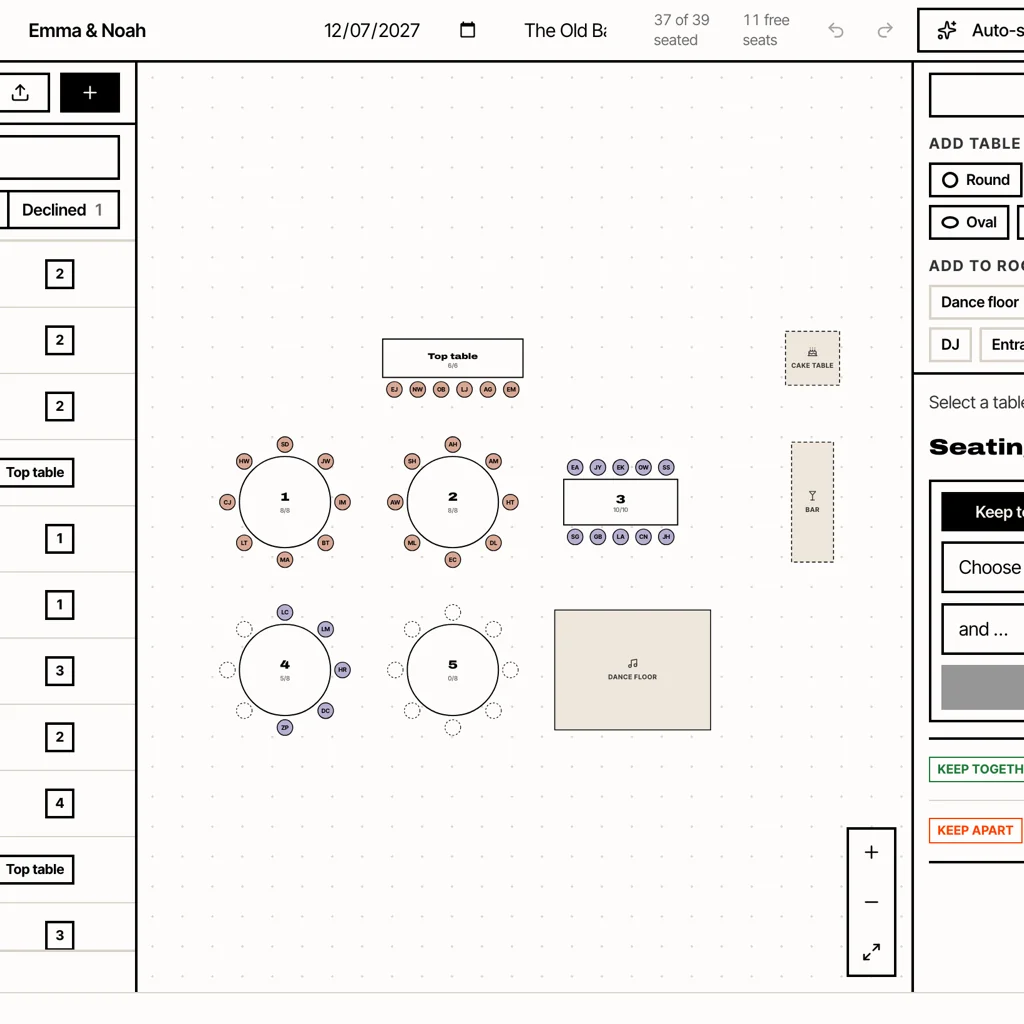
Seating Plan is the tool we build. It’s free to plan with unlimited guests and no account, and the guest list never leaves your browser. You start from one of six floor plans sized to your guest count, then drag guests or press Auto-seat. Auto-seat follows “keep together” and “keep apart” rules and never moves anyone you placed by hand. It imports and exports CSV.
The Simple poster and the A–Z guest list print free with a small credit line. A one-time €9.90 print pack adds five designed templates, place cards, a table-by-table list for the venue and a catering list with meals and allergies. Its real edge is language: the planner and every print layout work in English, French and Spanish, written for how each country searches and prints. That matters if half your guests read “plan de table” or “seating plan boda”.
Best when the wedding is small: planning.wedding
planning.wedding needs no sign-up, auto-seats for free and can read a photo of a handwritten guest list. The free plan stops at 5 tables, though, and the chart PDF is a paid feature at $29 per wedding. Under 50 guests it’s pleasant. Over that, you’ll pay or move.
Best if you also want a wedding website: Wedibox
Wedibox’s seating chart maker is free and saves in your browser. It auto-seats by group tags and exports a PNG; the PDF needs a free account. The paid $79 All-In-One plan links the chart to RSVPs and adds a photo-sharing wedding site. If you were going to buy a wedding site anyway, the bundle makes sense.
The ones with a catch
- seatplan.io: no guest or table cap and a clever AI floor-plan import, but no auto-seat. Saving and PDF export cost £8 to £14 for 90 days.
- Magic Table Planner: polished and in 13 languages, but free only up to 30 guests.
- Zola: fine if your guest list already lives on Zola, but the free plan stops at 15 guests and there’s no auto-seat.
- Social Tables: professional event software for planners and venues, priced by the month. It’s not built for a couple doing one wedding.
- Canva: beautiful seating chart templates, but it’s a design editor, not a seating tool. Nothing counts seats or warns you when table 7 has eleven people. Use it for the final sign if you like, after the plan is done.
How to choose in one minute
- Over 30 guests and you don’t want to pay: seatingchartgenerator.org, wedding.studio or Seating Plan.
- Guests or venue in France, Spain or Latin America: Seating Plan, for the FR and ES print layouts.
- Fewer than 5 tables: planning.wedding.
- You want a wedding website too: Wedibox.
- You’re a venue or planner: Social Tables or seatplan.io.
Whatever you pick, the method matters more than the tool. Our step-by-step guide to making a wedding seating chart covers when to start, guests per table and the rules that avoid drama.
Common questions
What is the best free wedding seating chart maker?
For most couples, seatingchartgenerator.org and wedding.studio are the most generous fully free tools: no account, no guest cap, free printing. Seating Plan is the best free choice if you need French or Spanish layouts, or want the guest list to stay in your browser.
Is there a seating chart maker with no sign-up?
Yes. seatingchartgenerator.org, wedding.studio, Seating Plan, planning.wedding and Wedibox all let you start without an account. Zola, Mariages.net and Bodas.net need one because the chart is tied to their guest list.
Which seating chart tools seat guests automatically?
seatingchartgenerator.org, wedding.studio, Seating Plan, planning.wedding and Wedibox have auto-seat on their free plans. seatplan.io and Zola don’t, and Stellanza keeps its AI seating for Premium.
Can I make a wedding seating chart from my Excel guest list?
Most dedicated tools import a CSV saved from Excel or Google Sheets. Our guide on making a wedding seating chart in Excel shows the columns to keep.
What is a good app for a wedding seating chart?
Seating Plan runs in any phone or laptop browser with nothing to install: free planning, auto-seat with rules, unlimited guests, and a €9.90 one-time print pack if you want the designed templates and place cards.
From the studio
Previous Article
Birthday Message for Boyfriend: 50 Sweet, Funny and Long Distance Wishes
Next Article
Application plan de table mariage gratuit : 8 outils comparés (2026)